
Set or change your emergency contact
Ensuring the availability of an emergency contact is of utmost importance. In the event of any urgent issue, it is crucial for us to promptly reach your company.
In cases where an emergency contact is not yet assigned or required information is missing, an attention-grabbing orange banner will be prominently displayed. Simply click on the banner to set an emergency contact directly or go to Settings > Users.

Mobile number
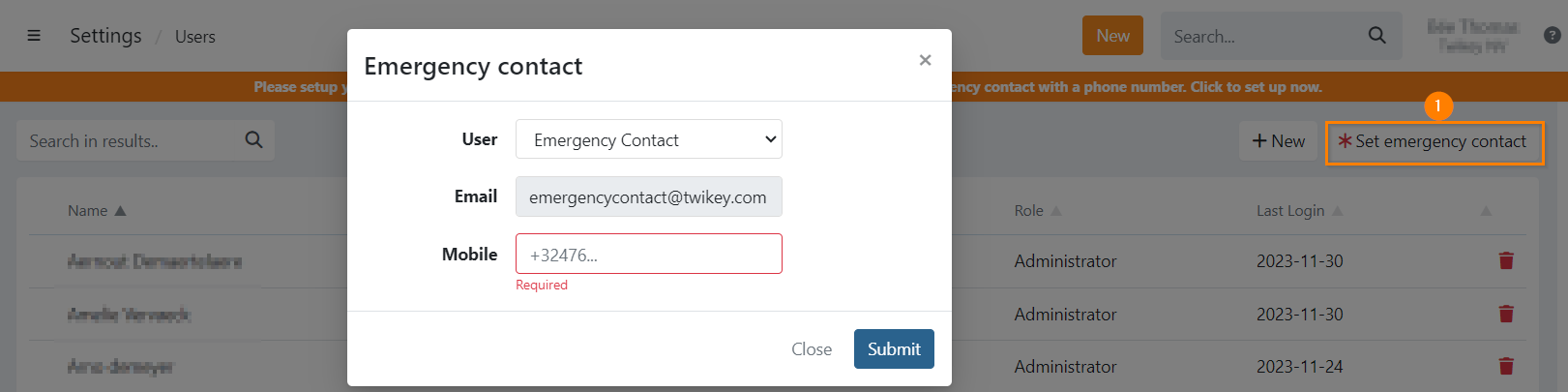
It is required that your emergency contact has a phone number, even when you already set a contact the banner is displayed until that contact has a mobile number.
Users
On the user overview you can use the button (1) to display the selection modal.
Here you can select or change your emergency contact. Click on to confirm your changes.
On your user overview, your current emergency contact has an asterisk icon in front of their user name.