
How to import invoices from Teamleader in Twikey
- Automatic import
- Manual import
- PDF of the invoice
- Sending invitations to your customers
- Troubleshoot
- Unable to import invoices
Invoices booked in Teamleader can be imported automatically or manually into Twikey.
In this article we will describe the different possibilities how invoices can be imported and most common causes why some invoices can't be imported.
Paid invoices, and invoices with a zero amount are not imported.
On your Teamleader integration, you can define specific profiles to use when importing invoices or subscriptions using custom fields from Teamleader. For more information about this, read our guide about Custom Fields.
Automatic import
The moment invoices get booked in Teamleader this will trigger our import service if you enabled
the option 'Import invoices and update customers automatically' in your integration.
This mostly takes a few minutes but can be a bit longer in some cases. When the invoice is still not available
in Twikey after an hour or longer, this means we could not import the invoice. Common causes for this are
described further in this article.
To retry importing those invoices you can do a manual import via CRM
in your Twikey environment.
Manual import
To manually import invoices go to the invoices overview in your Twikey environment.
On the overview select

On the import page then use (1) to open the import dialogue.
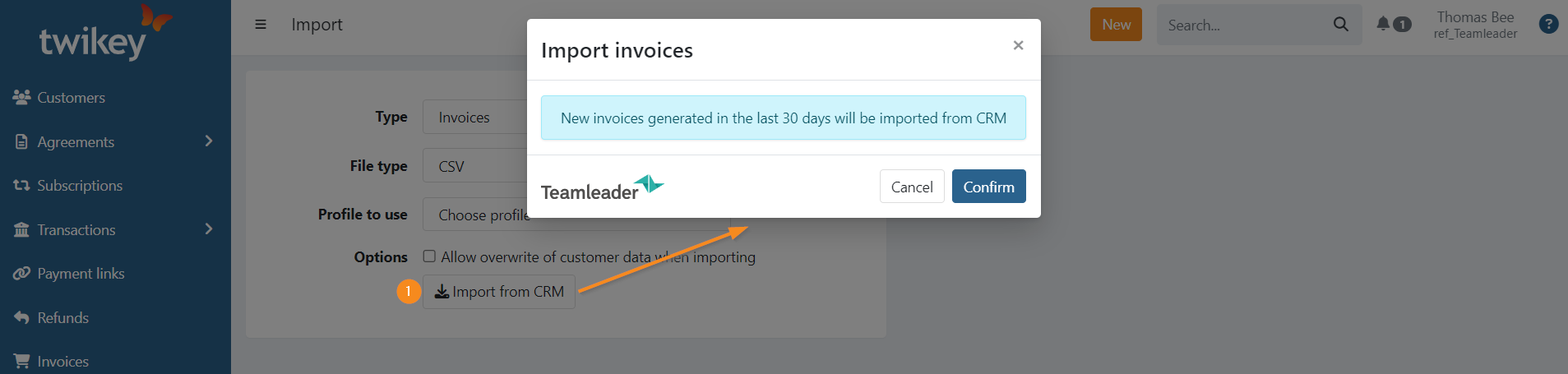
Click on to import all invoices created in the last 30 days.
A summary about the imported invoices is sent by email.
This option can also be used when missing invoices that should be imported automatically.
Be sure to look at the common causes of import issues in this article if your invoice is still not imported.
PDF of the invoice
The retrieval of the document(s) of the invoice(s) (PDF) are scheduled and imported at a later time. When the document is available the PDF-icon is displayed next to the invoice.
You can opt to manually retrieve the files if you need them sooner. For this, you can:
- Go to your invoices overview
- Set the advanced filter Pdf available: no
- Select the invoices
- Click on the three dots on the top right of the page
- Select "Download PDF documents"
Sending invitations to your customers
Invitations are either sent automatically or not, and only if the PDF of the invoice is available if it is configured as such on your profile.
In most cases your profile will be configured to send those out automatically once the PDF is available as such:
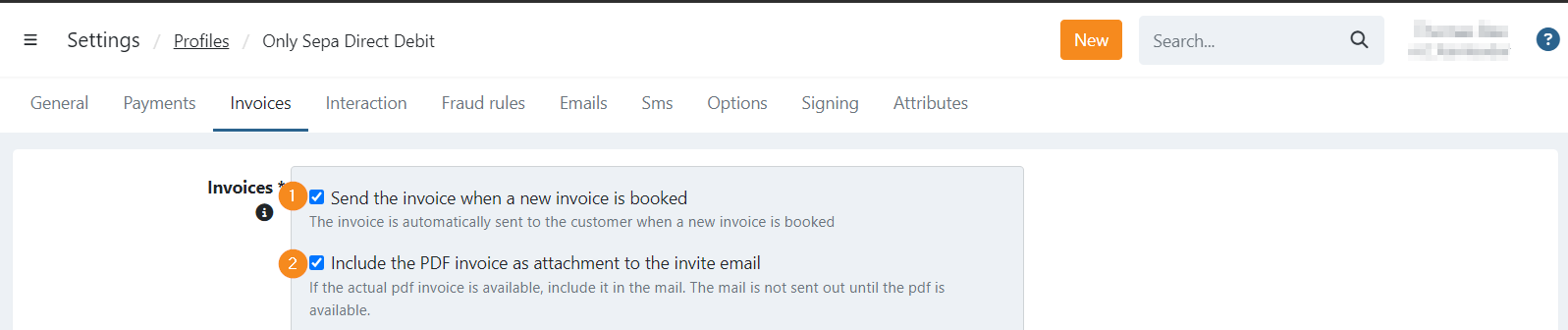
This means:
- When a new invoice is imported from Teamleader we directly send an invitation email.
- The invitation email is only sent if the PDF is also available
If you have both options enabled, the invitation is sent out once the PDF is retrieved, either if you manually downloaded the files or when Twikey imports them during the scheduled retrieval.
Troubleshoot
I don't see the file?
When the document is not available Twikey will retry automatically periodically to retrieve
the document.
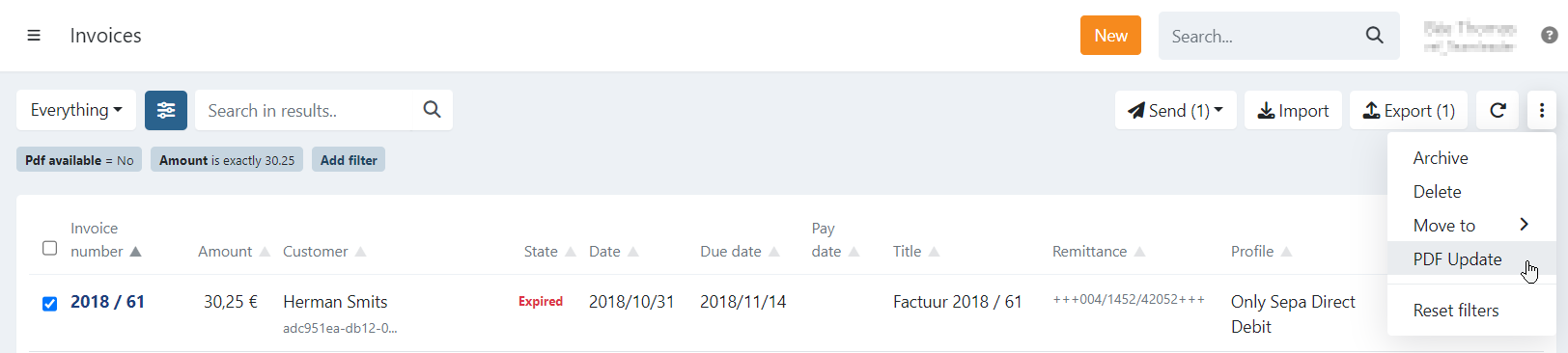
On the invoice overview you can also try to retrieve the file:
- Select the invoices for which you want to retrieve the document
- Click on the three dots in the top right corner
- Select 'PDF Update'
- We now try to retrieve the document(s), this can take a couple of minutes depending on the selection.
To refresh your invoices list you can use the button.
Unable to import invoices
Here you can find the main causes when invoices can't be imported.
To quickly determinate if you are in one of those situations, login to Teamleader and go to the invoice
details where you can see the activities for that invoice.
The amount of the invoice
Verify if the amount of the invoice is or was 0€ at some point.
Invoices with the amount of 0€ are not imported in Twikey, when the amount was updated later then
you need to use the manual import from CRM to retrieve the invoice.
The state of the invoice
Verify if the state of the invoice is paid in Teamleader.
Invoices that were updated to paid in Teamleader before they could be added in Twikey are not imported.
It is possible the state was booked before but the invoice was not automatically imported due to another
cause and is paid in the mean time.
Support
In case you still can't find the cause of import failures and want to contact our support for
assistance, please include the invoice details and activities in your ticket.