
How to send invitations for payment links
Show me
Send invitations
When sending invitations, you have the option to send one or multiple at once.
Single invitation
Clicking on the payment link opens the share modal, offering various sharing options:
- QR: Display a QR code that redirects to the payment page
- Email: A preview of the email, including the sender and recipient information, is shown. Simply click 'Send Invitation' to send the email to the customer.
- SMS:A preview of the text message, along with the recipient's phone number, is shown. Click 'Send' to send the message.
- Whatsapp: Requires the whatsapp client installed on your device. You are redirected to Whatsapp and can send out an invitation.
Multiple invitations
On the payment links overview, you can select all - or specific - payment links at once.
You can use the filters to display only payment links for which the invitation has not been sent yet, or already sent but via a specific channel.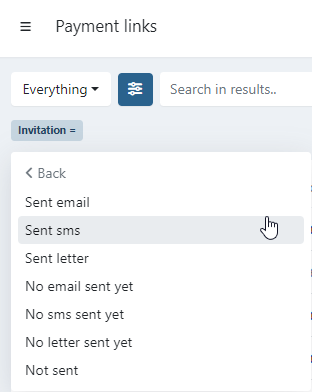
- Use the general checkbox on top to directly select all the links, or select specific ones:
- Click on
- A dropdown is displayed
- Invite
- Send via email
- Send via SMS
- Send via aangetekend Mailen (If the integration is turned on)
- Reminders
- reminder 1, 2, 3, or 4
- SMS
- Invite
When (some) selected payment links have no valid mobile number registered for the customer none of the payment link invitations are sent out.
You will receive a status email regarding this.
You will receive a status email regarding this.
Last Update: 2025-08-12