
Sending invoices using "Customer preference"
- How to send invoices by customer prefere...
- How to configure a default delivery meth...
- How to configure a delivery method on a ...
Send invitations for invoices to your customers at once using either your configured default delivery method on company level or, a specific delivery method of your customer.
The advantage is that you don't need to find and filter specific invoices depending on the channel that the customer wants to receive the invoice on (email, letter, peppol).
How to send invoices by customer preference
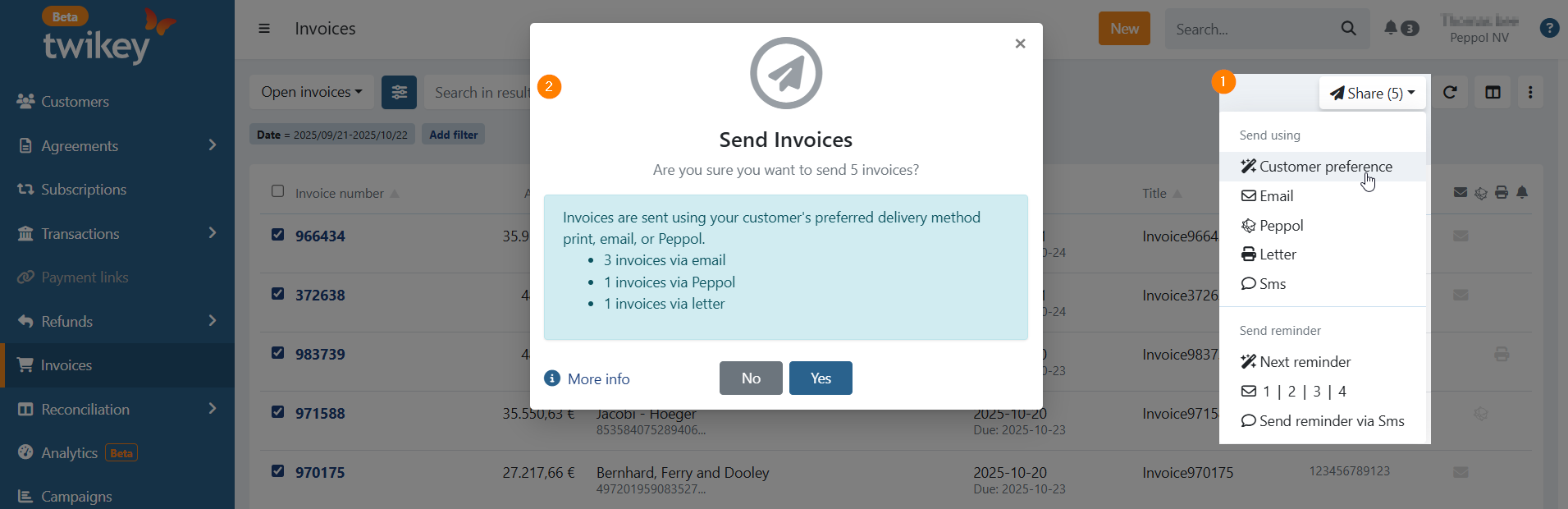
- Go to Invoices — by default, Open invoices are displayed.
- Set the Advanced filter Invitation to Not sent (optional).
- Select the invoices you want to send out.
- Click Share (1).
- A dialog appears showing the number of invoices and the delivery method that will be used (2).
- Click Yes to send the invoices or No to cancel.
How to configure a default delivery method
Your delivery method at company level is Email by default. You can verify this:
- Go to Settings > Account
- Open the Company tab
- On this tab, the Invoice delivery method is displayed with the Edit button.
Edit the default method for person and company-type customers:
- Contacts: Only Email can be selected
- Companies: Email or Peppol can be selected
To use Letter as a default delivery method, it must be configured on the customer itself; it cannot be set as a company-level default.
How to configure a delivery method on a customer
- Go to your customer
- Click on Edit
- Open the Invoice tab
- Select the specific Delivery Method for this customer.
Last Update: 2025-10-21