
Overview of your customers
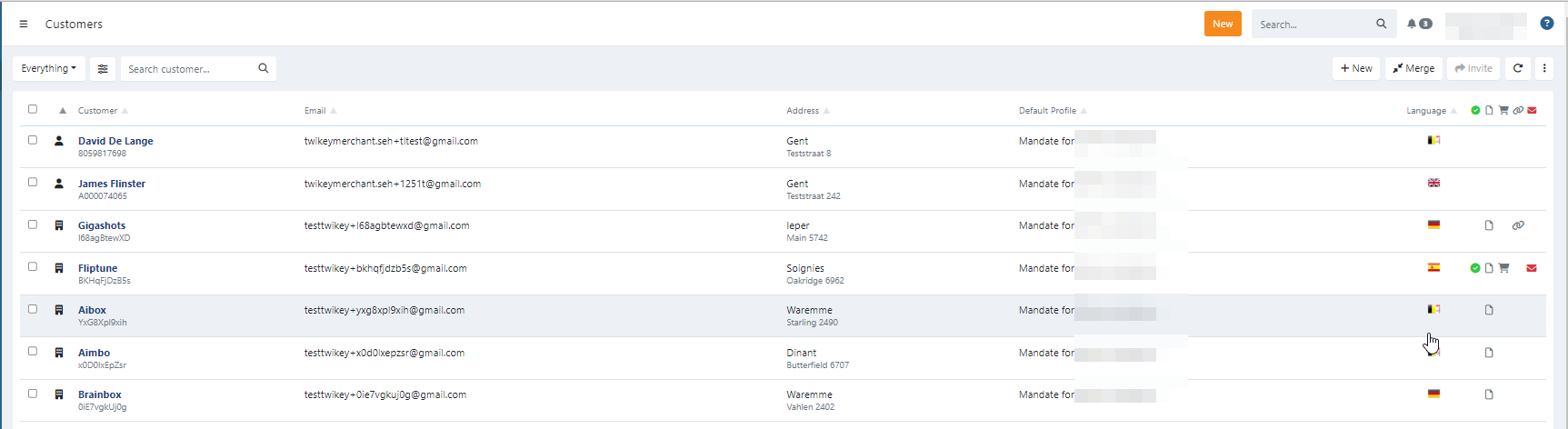
The customer overview makes it easy to find and filter customers.
Each customer-tile provides information about the customer and the products owned by it:
- Signed documents ()
- Pending documents ()
- Invoices ()
- Payment links ()
- Invalid email address ()
- The customer is a company
- The customer is an individual
Find a customer
Use the search and filters functions to find specific customers.
You can also search using the global search to search on name (company or individual), customer number or e-mail address.
Quick actions
Quickly call or email a customer? That is possible!
Go over the bottom-part of a customer-tile to display more options, click on the option to:
- Email the customer ()
- Call the customer ()
Last Update: 2025-08-12