
Revoke and Reoffer a Batch
- Why would you do this
- How to revoke a batch
- How to reoffer a batch
- How to find batches to reoffer
- Requesting a reoffer
Why would you do this
Revoking a batch
When transactions were sent to the bank by mistake (wrong amounts, wrong customers, etc.) and you need to stop them from being collected.
Reoffering a batch
When the bank had an error and couldn't process your batch, so you need to send it again.
How to revoke a batch
If the batch is already sent to the bank
Contact your bank immediately, this is the only way to stop the collection !
The batch can be canceled if it's not sent yet for collection, or if the bank did not already start the collection process.
If the batch is not yet sent to the bank
You can delete it directly in Twikey:
- Navigate to the "To be sent" menu
- Click the Delete All button (trash icon)
- Select the batch you want to delete
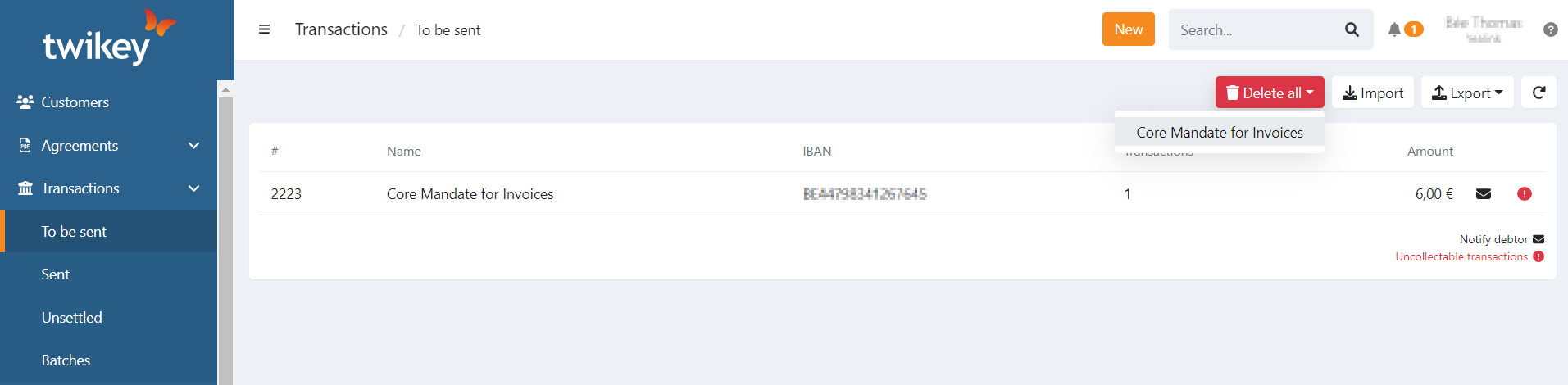
This will delete all transactions in the batch.
When you upload a Direct Debit file, it's sent to the bank immediately. You won't have time to delete it in Twikey.
How to reoffer a batch
You can only reoffer a batch if:
- The entire batch has never received feedback from the bank (still "open")
- You'll see a paper plane icon next to these batches in this case
How to find batches to reoffer
Use the "Feedback missing" filter on the batches overview to see only open batches.
Requesting a reoffer
Contact Twikey Support to reoffer the batch.
When we reoffer it:
- A new batch is created and sent to the bank
- The original batch is automatically archived
Only reoffer when you're certain the bank didn't process the original batch. Archiving a batch in Twikey does not stop the bank from collecting the money.
Last Update: 2026-02-06