
Defining risk rules
Risk rules let you limit the total transaction amount or number of transactions allowed per agreement within a given time period. This helps reduce the risk of failed or fraudulent transactions. You can define risk rules per profile — they apply to all agreements based on that profile.
Example:
- Rule 1: max €100 per 7 days.
- Rule 2: max €400 per 30 days.
You can combine multiple rules on the same profile.
Add a risk rule
- Navigate to Settings in the left-hand navigation menu.
- Click Profiles.
- Click the profile you want to configure.
- Open the Payments tab.
- In the Risk rules section, click +.
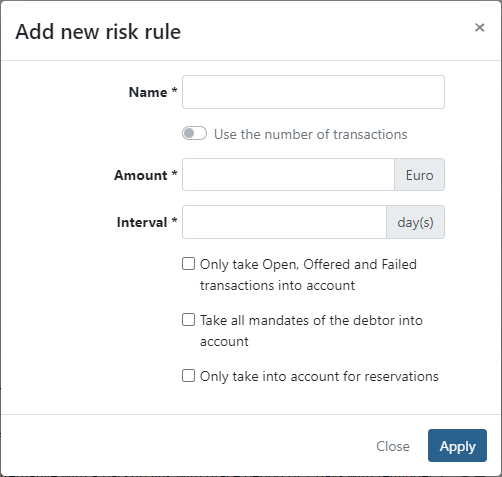
- Define a Name for the rule.
- Enable Take all mandates of the debtor into account if you want to include transactions across all agreements of the same debtor in the calculation.
- Set the rule type:
- By amount — enter a maximum transaction Amount (in €) that cannot be exceeded during the interval.
- By count — enable Use the number of transactions. The Amount field changes to Transactions. Enter the maximum number of transactions allowed during the interval.
- Enter an Interval in days — the period during which the limit applies.
- Under Status, select at least one transaction status the rule should apply to:
- New transaction — applies when a new transaction is created.
- Only applies to reservations — applies this rule only when creating a reservation via the API, without affecting regular transactions.
- Open — includes open transactions.
- Offered — includes transactions already offered to the bank.
- Paid — includes paid transactions.
- Failed — includes failed transactions.
- Click Apply to add the rule.
- Click Save to save the profile.
When the maximum transaction count is reached for an agreement, newly imported invoices will not be linked to that agreement — only to the customer. You will need to manually assign them to the agreement once the transaction count allows it.
Last Update: 2026-03-09