
Use of variables in emails
The relevant variables are shown per mail. Variables that are not shown in the mail are not applicable here (because this information is not available for that mail; e.g. the variable for the invoicing message cannot be used in the 'invite' mail)
Note that not every variable refers to the same information in different mails. Variables 'ref' and 'link' will refer to different values in different contexts.
If you use a variable that cannot be resolved, there will be a space where the empty variable is added to the email.
If you add a custom attribute to a profile (see article 'Attributes'), you can use your own defined attribute as a variable in your emails.
Variables or regular text can be shown with a specific layout, e.g. heading title or a button. Options are shown on this page https://www.markdownguide.org/basic-syntax/. You can access this website trough the button on the edit email pop-up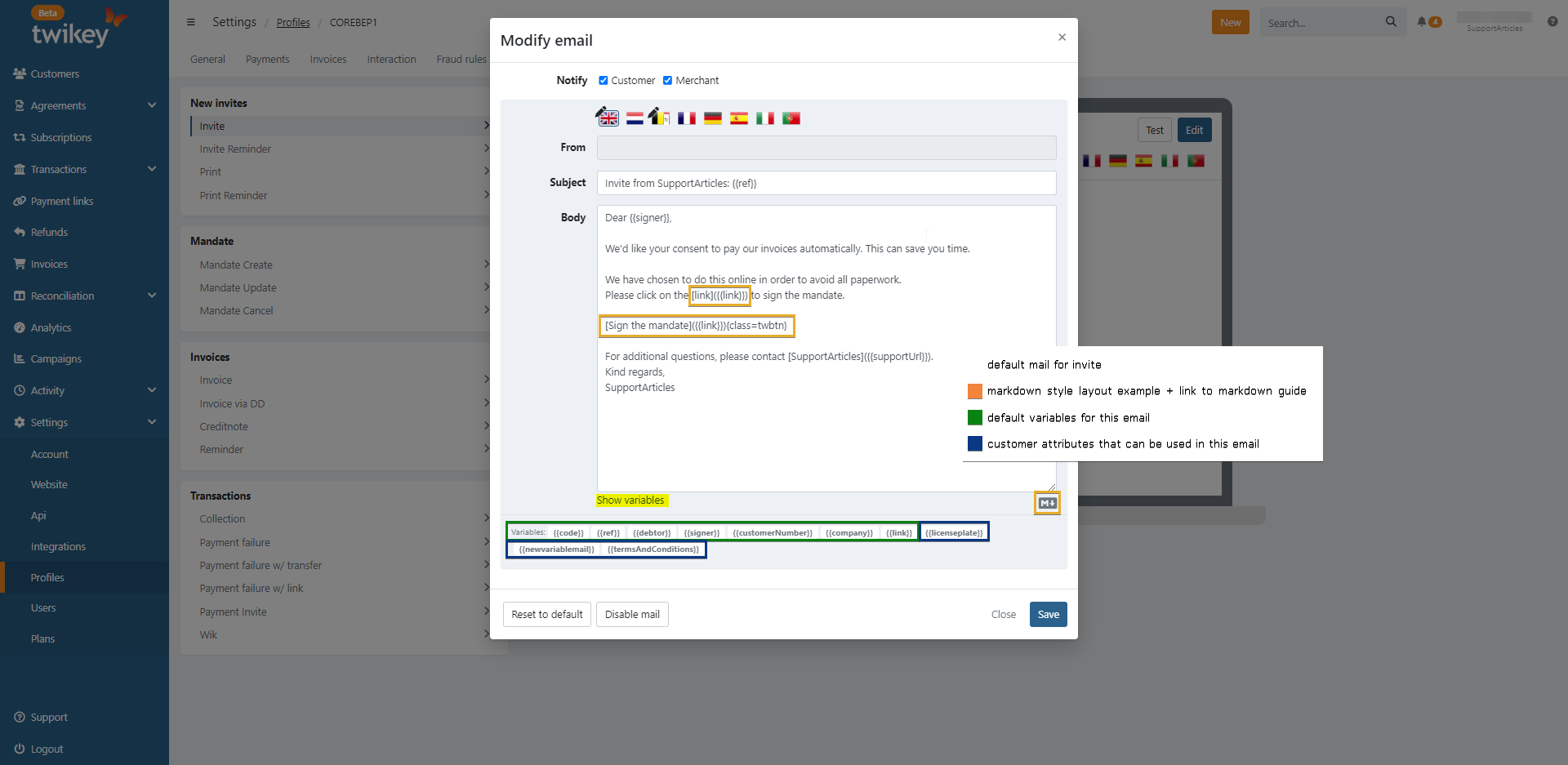
New invites
Invite and invite reminder
When sending an invite or invite reminder with variables, you can see the resolved value in the UI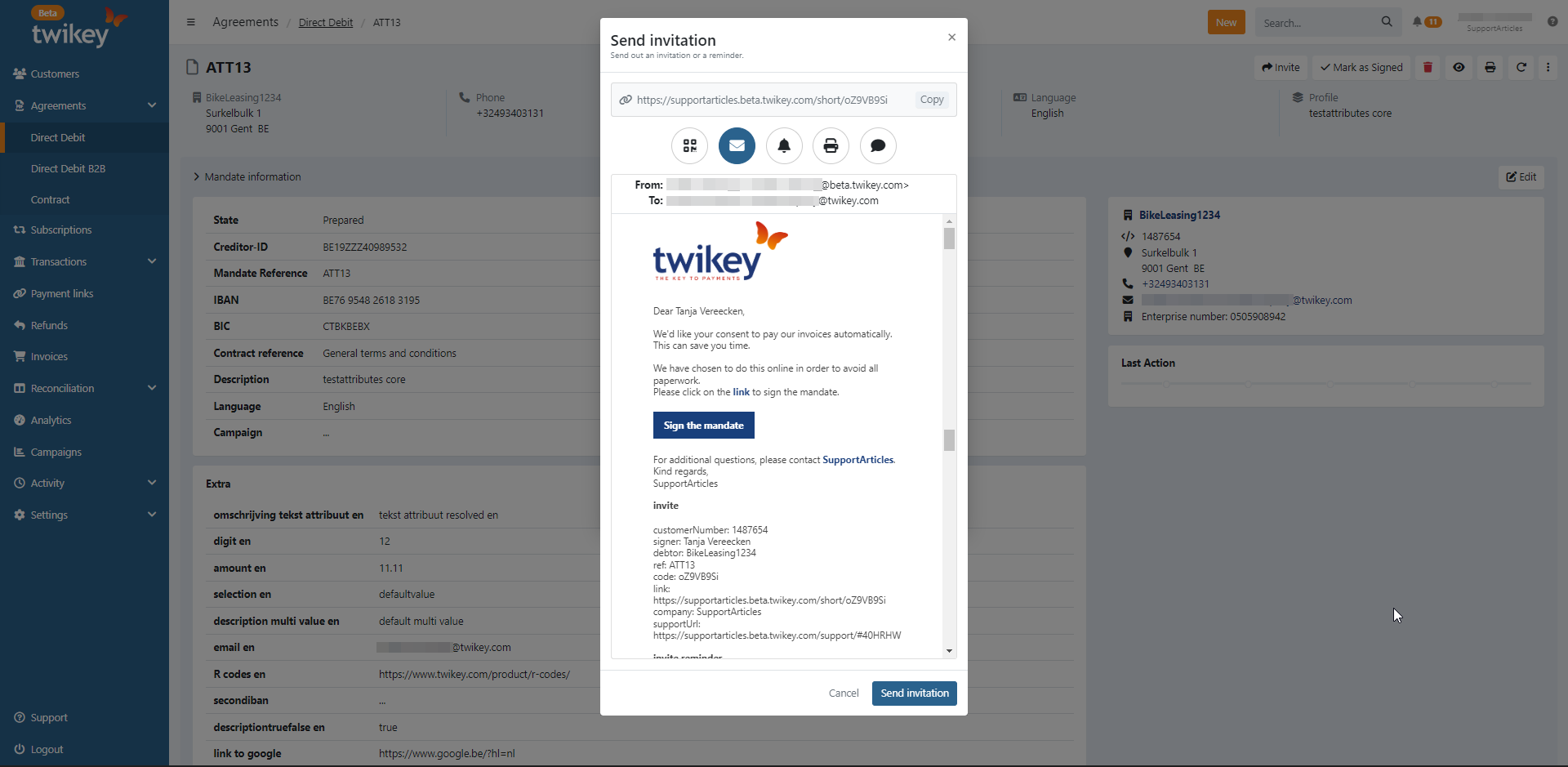
Difference debtor and signer
{{signer}}: firstname + lastname- If there is no first- and lastname: variable will stay empty
{{debtor}}: company name- If there is no company name: signer and debtor are both resolved with firstname + lastname
If there is no first- and lastname: signer: empty, debtor: company name
If you want a personal address, it's best to use the variable 'signer,' and if the first and last name are not always filled in your customer data, you should use the variable 'debtor' instead.
{{customerNumber}}: Customer number is shown if there is one{{ref}}: Reference to the document, here the mandate or contract you are sending the invite for.- The subject of the email contains DOC123 by default, this is the mandate reference. When changing anything to the subject, this will be hardcoded DOC123. It is better to use {{ref}} in this case <!-- COMMENT improvement? ---
{{code}}: Shortcode to document used in the link{{link}}: Link to the document to sign, can be shown as a link or as a button (as in default mail).- Button: Sign the mandate{class=twbtn}

- Custom text on link: you can
[still give your consent here]({{link}})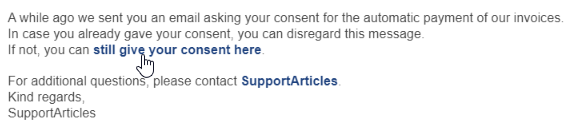
- Link:The link is composed of
https://yourdomainname.twikey.com/short/code
- Button: Sign the mandate{class=twbtn}
{{company}}: Name of creditor's/merchant's company{{supportUrl}}: Url to FAQ's for the debtor https://yourdomainname.twikey.com/support/- You can alter this attribute to immediately redirect the debtor to a specific language using for example:
{{supportUrl}}?l=nlthe supported languages are: nl, fr. By default the page is in English.
- You can alter this attribute to immediately redirect the debtor to a specific language using for example:
{{customerNumber}}: Customer number is shown if there is one- Variables to let your customer deliver you the document
{{b2bEmail}}: Company email (creditor): email address shown in Settings > Account > Company Information. Can be used to allow your customer send his signed document by mail{{uploadUrl}}: Url where the debtor, your customer, can upload the signed document
{{ref}}: Reference to the document, here the mandate or contract you are sending the invite for.{{name}}: Name of debtor's company if there is one, otherwise the first- and lastname of the customer
Print reminder
{{firstname}}: First name of the debtor{{lastname}}: Last name of the debtor{{creditor}}: Company name of the creditor{{customerNumber}}: Customer number is shown if there is one{{mandate reference}}: Reference to the mandate{{mandate reference}}: Reference to the mandate{{contract}}: Contract number{{uploadUrl}}: https://supportarticles.beta.twikey.com/paper/R1r0IadjKir{{returnEmail}}: Company email (creditor): email address shown in Settings > Account > Company Information. Can be used to allow your customer send his signed document by mail
Mandate
Mandate create
- PDF file is attached to this email
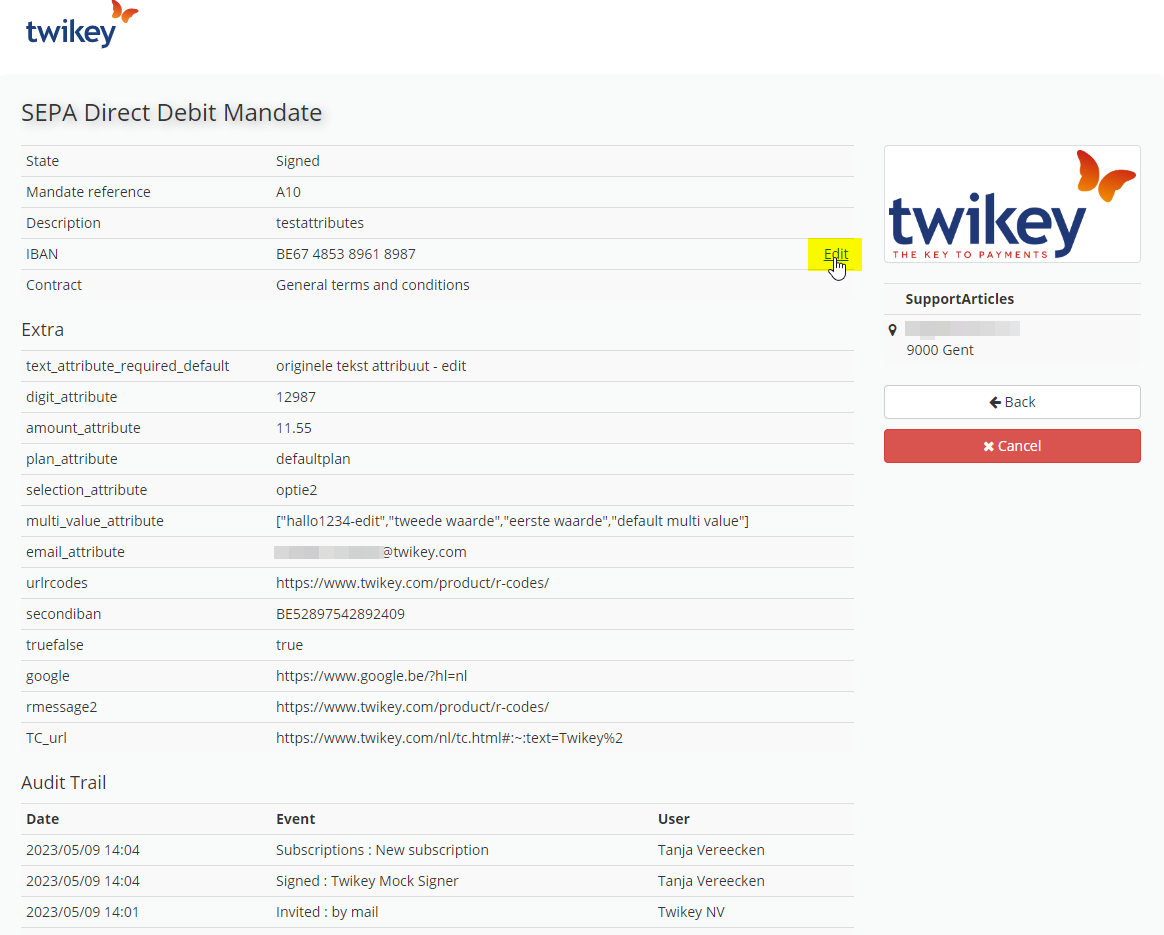
{{firstname}}: First name of the debtor{{lastname}}: Last name of the debtor{{creditor}}: Company name of the creditor{{link user}}: Link to the signed document https://www.twikey.com/login.html?email=`[email]`&doc=`[ref]`- When clicked, user lands on the Twikey login page; with email address and mandate reference prefilled
- If the user logs in, they land on a page with data and actions on the document.
- They can open and save the PDF file of the document.
- They can update the IBAN - only on CORE mandates
{{ref}}: Reference to the document, here the mandate or contract that has been created{{email}}: Email address of the signer{{customerNumber}}: Customer number is shown if there is one
Mandate update
Only applicable for CORE mandates: The debtor or merchant can update the IBAN. A mail can be sent triggered by this action. The merchant can also update address info, but we only sent out a mail for updating IBAN or emailaddress, custom attributes.
{{firstname}}: First name of the debtor{{lastname}}: Last name of the debtor{{creditor}}: Company name of the creditor{{reason}}: Reason merchant entered when cancelling the mandate{{customerNumber}}: Customer number is shown if there is one{{desc}}: Name of updated field; email, account (=IBAN), name of custom attribute{{support_mail}}: Company e-mail (creditor): email address shown in Settings > Account > Company Information.{{value}}: updated value IBAN / emailaddress / custom attribute{{mandateNumber}}: Mandate number{{old}}: old value IBAN / emailaddress / custom attribute
Mandate cancel
{{firstname}}: First name of the debtor{{lastname}}: Last name of the debtor{{creditor}}: Company name of the creditor{{reason}}: Reason merchant entered when cancelling the mandate{{customerNumber}}: Customer number is shown if there is one{{contract_mandateNumber}}: Reference to the mandate{{contract_name}}: Name of the profile used to create the mandate
Invoices
Invoice, invoice via Direct Debit (mail for users that have signed a mandate), creditnote and reminders
{{invoice_due}}: Due date of the invoice{{invoice_date}}: Creation date of the invoice{{invoice_paymsg}}: Remittance field{{customerNumber}}: Customer number is shown if there is one{{name}}: Name of debtor's company if there is one, otherwise the first- and lastname of the customer{{link}}: Payment link (not applicable for creditnote){{statuslink}}: Image with up to date status of the invoice- In default mail this is used as follows:
<p><a href="{{link}}" title="Pay" alt="Pay"><img src="{{statuslink}}"></a></p> - The payment link is default also shown with text below the image.
<a href="{{link}}">View your invoice</a>
- In default mail this is used as follows:
{{invoice_msg}}: Title of the invoice (field 'title' in import CSV and Twikey UI){{invoice_total}}: Total amount of the invoice (shown with currency)
Transactions
Collection
{{firstname}}: First name of the debtor{{lastname}}: Last name of the debtor{{creditor}}: Company name of the creditor{{ref}}: Reference on transaction, if there is no value, the variable is resolved with 'no ref'{{msg}}: Communication on the transaction / When creating a transaction: what is entered in the field 'communication to debtor' / Remittance entered in import CSV invoices{{date}}: Collection date transaction{{txdate}}: Creation date transaction{{mandateNumber}}: Mandate number{{amount}}: Amount of the collection (shown with currency)
Payment failure and Payment failure w/ transfer
Mails sent out automatically from dunning steps (reminder 1 to 4) or manually when sending a reminder from a failed transaction
{{firstname}}: First name of the debtor{{lastname}}: Last name of the debtor{{creditor}}: Company name of the creditor{{customerNumber}}: Customer number is shown if there is one{{mandateNumber}}: Mandate number{{adminCharges}}: Added administrative charges (set in dunning steps){{ref}}: Reference on transaction, if there is no value, the variable is resolved with 'no ref'{{total}}: Total amount: amout of the payment + administrative charges{{accountNumber}}: IBAN Debtor{{txdate}}: Creation date transaction{{date}}: Generation date of the initial transaction (= batch creation){{msg}}: Communication on the transaction / When creating a transaction: what is entered in the field 'communication to debtor' / Remittance entered in import CSV invoices{{creditorId}}: Creditor ID{{support_mail}}: Company email (creditor): email address shown in Settings > Account > Company Information. Can be used to allow your customer send his signed document by mail
Payment failure w/link #1 - #4
Mails sent out automatically from dunning steps or manually when sending a reminder from a failed transaction
{{firstname}}: First name of the debtor{{lastname}}: Last name of the debtor{{creditor}}: Company name of the creditor{{customerNumber}}: Customer number is shown if there is one{{msg}}: Communication on the transaction / When creating a transaction: what is entered in the field 'communication to debtor' / Remittance entered in import CSV invoices{{amount}}: Amount of the payment (shown with currency){{adminCharges}}: Added administrative charges (set in dunning steps){{total}}: Total amount: amout of the payment + administrative charges{{mandateNumber}}: Mandate number{{support_mail}}: Company e-mail (creditor): email address shown in Settings > Account > Company Information. Can be used to allow your customer send his signed document by mail{{ref}}: Reference on transaction, if there is no value, the variable is resolved with 'no ref'{{txdate}}: Creation date of the transaction{{date}}: Collection date of the transaction{{today}}: Date of today{{backupLink}}: Backup link: payment link, second link possibly with added administrative charges. Variable{{link}}(original link) cannot be used here anymore{{backupLinkExpiry}}: Expiry date of backup link{{creditorId}}: Creditor ID{{accountNumber}}: IBAN Debtor
Payment Invite
{{firstname}}: First name of the debtor{{lastname}}: Last name of the debtor{{creditor}}: Company name of the creditor{{link}}: Payment link{{amount}}: Amount of the payment (shown with currency){{customerNumber}}: Customer number is shown if there is one{{ref}}: Reference of transaction{{msg}}: Remittance of transaction
Wik
{{firstname}}: First name of the debtor{{lastname}}: Last name of the debtor{{creditor}}: Company name of the creditor{{ref}}: Reference on transaction{{today}}: Date of today{{date}}: Collection date of the transaction{{txdate}}: Creation date transaction{{amount}}: Amount of the payment (shown with currency){{adminCharges}}: Added administrative charges (set in dunning steps){{backupLink}}: Backup link: payment link, second link possibly with added administrative charges. Variable{{link}}(original link) cannot be used here anymore{{backupLinkExpiry}}: Expiry date of backup link{{support_mail}}: Company email (creditor): email address shown in Settings > Account > Company Information. Can be used to allow your customer send his signed document by mail{{customerNumber}}: Customer number is shown if there is one{{delay}}: Number of days set as delay. Today's date +{{delay}}days{{total}}: Total amount: amout of the payment + administrative charges{{msg}}: Communication on the transaction / When creating a transaction: what is entered in the field 'communication to debtor' / Remittance entered in import CSV invoices
Custom attributes
It is possible to create your own attributes. These can also be used as variables in the emails.
Custom attributes are not automatically updated in the mails, when changing the name of the attribute, make sure to update it in your mail as well!