
What is the Payment Hub
- What can you manage with the Payment Hub
- Bank gateway
- Payment Service Provider gateway
- Assigning new gateways to profiles
- Gateway states
The Payment Hub is your central place to manage all payment integrations within Twikey. It brings everything together in one clear interface, making setup and ongoing management faster and more intuitive.
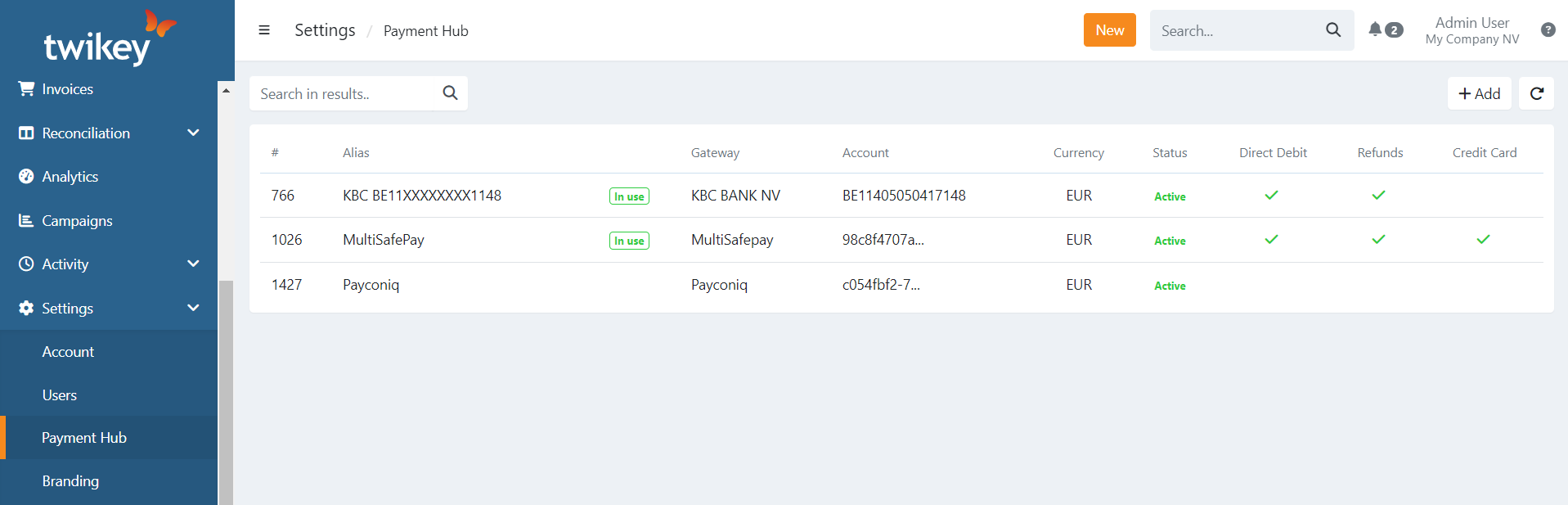
What can you manage with the Payment Hub
Connect your own bank account(s):
Easily set up and manage your bank connections used for collections and reporting.Connect or activate a Payment Service Provider(s) (PSP):
Add and manage different payment methods in one place.
This allows you to collect payments in the way that best fits your business needs..
Bank gateway
A bank gateway connects your Twikey environment directly with your own bank account.
This connection is required to exchange direct debit and reporting files with your bank.
You can configure multiple bank gateways if you use more than one bank account.
Supported payment types:
- Direct Debit (PAIN.008)
- Sepa Credit Transfer (PAIN.001) (availability depends on the type of bank)
Payment Service Provider gateway
A Payment Service Provider Gateway connects Twikey with an external payment service provider.
- If you already have a PSP and Twikey supports it, you can activate the connection and start using it immediately.
- If you don’t have a PSP yet, you can request one directly from Twikey.
- Not sure which PSP to choose? Contact our support team and we’ll help you select the best option for your use case.
Supported payment types:
- One-off payments (Payment links)
- Recurring Credit card payments
- Direct debit (PAIN.008) on the account of the PSP
Note: Available features depend on what is enabled in your payment provider account.
Assigning new gateways to profiles
After a gateway is activated, it must be assigned to one or more profiles.
This step is required before you can use the gateway to collect payments.
How to assign a gateway
- Navigate to settings menu
- Choose a profile to connect
- Navigate to the general tab
- Select your gateway in the corresponding type of payment.
Note: If you cannot select a gateway, it is either not activated yet or not available for that specific payment type. Please contact our support team for assistance.
Gateway states
Each gateway in the Payment Hub has a status that indicates whether it is ready for use:
| State | Meaning |
|---|---|
| Active | The gateway is connected and ready to use |
| Inactive | The gateway has been disabled |
| Test | The gateway is in test mode — no real payments are processed |
| Pending | Setup is in progress — the gateway is not yet ready |
| Error | A connection or configuration problem was detected — contact support |
| Blocked | The gateway has been suspended — contact support |