
Email & SMTP configuration guide
- What you'll learn
- Contact your IT administrator
- Understanding Email security (SPF & ...
- Accessing the email integration settings
- Option 1 : Using Twikey SMTP Server
- Step 1: Configure SPF
- Step 2: Configure DKIM (Strongly recomme...
- Step 3: Configure your environment
- Option 2 : Using a custom SMTP server
- Step 1: Configure DKIM (Optional but rec...
- Step 2: Enter your FROM address
- Step 3: Enter SMTP connection credential...
- Step 4: Test and save
- Recommended external SMTP providers
- Validating your setup
- Troubleshooting common issues
- When to contact your IT Department
- When to contact Twikey support
- Best practices
- DNS record examples
- Common SMTP ports
- Glossary
Show me
This guide will help you set up email integration with Twikey so you can send emails from your own email address. We'll explain everything step-by-step, including some important email security concepts.
What you'll learn
- How to send emails through Twikey using your own email address
- What SPF and DKIM are and why they matter
- How to configure your email integration (two different ways)
- How to test that everything works correctly
Contact your IT administrator
We strongly recommend sharing this guide with your IT department or mail domain administrator before starting the configuration. DNS changes can affect your email delivery and website functionality, so having your IT team review and implement these settings ensures everything is configured correctly and safely. They can also help troubleshoot any issues that may arise during setup.
Understanding Email security (SPF & DKIM)
Before we dive into the setup, let's understand two important email security technologies. These help ensure your emails actually reach your customers' inboxes instead of their spam folders.
What is SPF?
SPF (Sender Policy Framework) is like a guest list for your email domain. It tells other email servers: "These are the servers allowed to send email on behalf of my domain."
Why it matters:
- Without SPF, anyone could pretend to send emails from your domain
- Email providers check SPF to verify emails are legitimate
- Helps prevent your emails from being marked as spam
Simple analogy: Think of SPF as a bouncer at a club with a list of approved people. If someone tries to enter (send an email) claiming they're from your company, the bouncer (receiving email server) checks the list (SPF record) to verify they're actually allowed.
What is DKIM?
DKIM (DomainKeys Identified Mail) adds a digital signature to your emails, like a wax seal on an official letter. This proves the email hasn't been tampered with and really came from your organization.
Why it matters:
- Proves your email is authentic and hasn't been modified
- Significantly reduces the chance of emails going to spam
- Builds trust with email providers
Simple analogy: DKIM is like sending a sealed envelope with your company's official stamp. The recipient can verify the seal is intact and confirms it came from you.
Do I need both?
SPF is required to send emails through Twikey.
DKIM is strongly recommended because:
- It dramatically improves email deliverability
- Your emails are much less likely to land in spam
- It's an industry best practice for professional email communication
Accessing the email integration settings
- Navigate to Settings > Integrations
- Select the Email integration
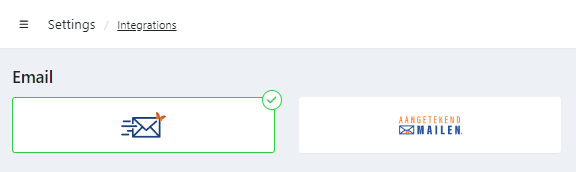
- Choose Twikey SMTP Server or Custom SMTP server.
Option 1 : Using Twikey SMTP Server
With this setup, Twikey handles the email sending for you.
When you use Twikey's SMTP server, emails are added to a queue and sent in order. Think of it like a line at a coffee shop - first come, first served.
Things to know:
- Emails are typically sent within minutes
- High-traffic periods (especially around the 1st of the month during billing) may cause delays
- If you need guaranteed immediate sending, consider using a custom SMTP server instead
Step 1: Configure SPF
SPF setup requires adding a record to your domain's DNS settings. This tells email servers that Twikey is allowed to send emails on your behalf.
Option 1 : If you already have an SPF record
Add this text to your existing SPF record: include:_spf.twikey.com
Example:
If your current SPF record is:
v=spf1 include:_spf.google.com ~all
Update it to:
v=spf1 include:_spf.google.com include:_spf.twikey.com ~all
Option 2 : If you need to create a new SPF record
Add a new TXT record to your DNS with these details:
Example: (replace example.com with your actual domain)
| Field | Value |
|---|---|
| Name/Host | example.com. |
| Type | TXT |
| Value | v=spf1 include:_spf.twikey.com ~all |
Option 3 : Advanced SPF setup (For technical users)
If you're experiencing DNS lookup limits, you can use one of these alternative configurations:
Option A: Use the 'a' mechanism
This points directly to Twikey's mail server and automatically adjusts if our IP changes.
| Field | Value |
|---|---|
| Name/Host | example.com. |
| Type | TXT |
| Value | v=spf1 a:mail.twikey.com ~all |
Option B: Use the direct IP address
This authorizes Twikey's specific IP address. Note: This IP is currently static but may occasionally change.
| Field | Value |
|---|---|
| Name/Host | example.com. |
| Type | TXT |
| Value | v=spf1 ip4:52.29.184.146 ~all |
Step 2: Configure DKIM (Strongly recommended)
DKIM requires adding two DNS records - one for the live environment and one for testing.
Why two records?
appselector: Used for your live/production environmenttestselector: Used for Twikey's beta/testing environment
Adding DKIM Records
Add these two CNAME records to your DNS (replace example.com with your domain):
| Name/Host | Type | Value |
|---|---|---|
| app._domainkey.example.com. | CNAME | app._domainkey.twikey.com. |
| test._domainkey.example.com. | CNAME | test._domainkey.twikey.com. |
Step 3: Configure your environment
Now that your DNS is set up, configure the integration in Twikey:
- Enter your FROM address : this is the email address recipients will see when they receive your emails. Add also a friendly name.
The friendly name appears in the recipient's inbox instead of just the email address, making it more recognizable.
f.ex. : Twikey Support < info@example.com > (remove the spaces between the <>)
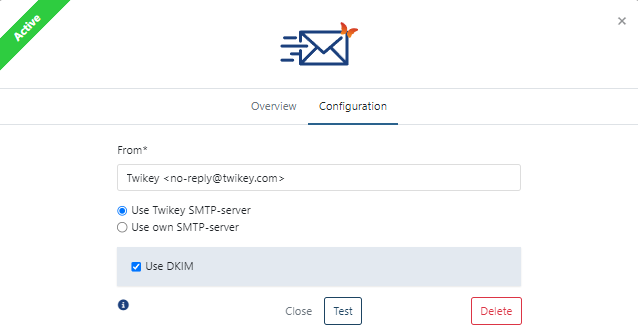
- If you configured the DKIM records in Step 2, check the Enable DKIM checkbox.
- Click the Test button and wait for the test results
Success: You should see a confirmation message that tests passed. - Check your inbox for the test email
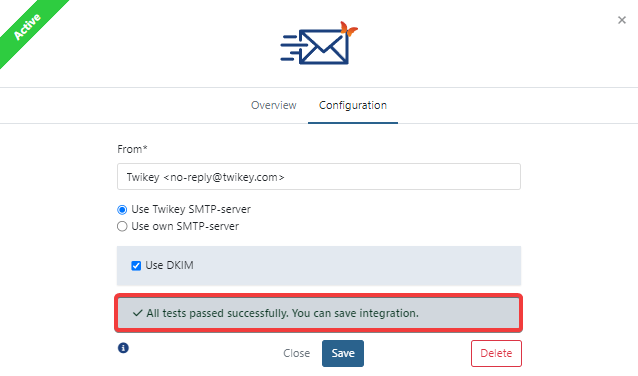
- Once tests pass, click Save.
- Your email integration is now active.
Test failed?
Common issues:
- DNS records haven't propagated yet (can take up to 48 hours)
- Typo in DNS records
- Incorrect domain name used
If problems persist, contact your IT support or Twikey support.
Option 2 : Using a custom SMTP server
Choose this option if you want to use your own email provider (like SendGrid, Combell, etc.) or have specific requirements that Twikey's SMTP server doesn't meet.
Why use a custom SMTP server?
- Full control over email sending
- Avoid Twikey's email queue
- Use existing email infrastructure
- Better for high-volume senders
Note: Even with a custom SMTP server, we strongly recommend configuring DKIM for better deliverability.
Step 1: Configure DKIM (Optional but recommended)
Follow the same DKIM setup steps as described above.
Step 2: Enter your FROM address
Use the same format as described in above.
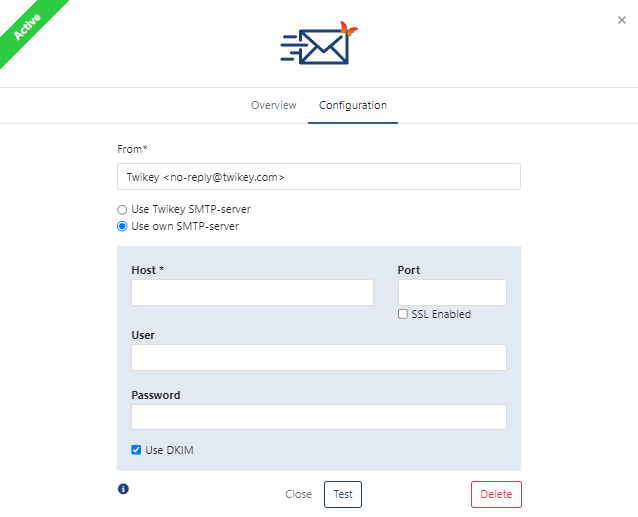
Step 3: Enter SMTP connection credentials
You'll need to get these details from your email provider.
Here's what each field means:
| Field | Required? | What It Is | Example |
|---|---|---|---|
| Host | Yes | The server address of your SMTP provider | smtp.yourprovider.com |
| Port | No | The connection port (usually 25, 587, or 465) | 587 |
| SSL Enabled | No | Encrypts the connection for security | Checked (recommended) |
| Username | No | Your SMTP account username | user@yourcompany.com |
| Password | No | Your SMTP account password | your_secure_password |
Default values if left empty :
- Port:
25(or587if SSL is enabled) - SSL: Disabled
- Username/Password: Not used
Not Supported :
- Gmail - The FROM address must match your Gmail username exactly
- Office 365 - Same restriction as Gmail
- Both may also throttle emails, causing delays
For these providers, we recommend using a dedicated email service like SendGrid instead.
Step 4: Test and save
Follow the same testing and saving steps as described above.
Recommended external SMTP providers
If you're setting up a custom SMTP server, here are pre-configured settings for popular providers:
Combell
Host: smtp-auth.mailprotect.be
Port: 587
SSL: Enabled
SendGrid
Host: smtp.sendgrid.net
Port: 587
SSL: Enabled
Need other providers?
Most business email providers offer SMTP access. Check their documentation for connection details, or contact Twikey support for help.
Validating your setup
After configuration, it's a good idea to verify everything is working correctly.
Check your SPF record
- Visit mxtoolbox.com/spf.aspx
- Enter your domain name (e.g.,
example.com) - Click SPF Record Lookup
- Verify that
_spf.twikey.comappears in the results (or your specific IP if using advanced setup)
What success looks like: You should see a green checkmark and your SPF record listed.
Check your DKIM records
- Visit mxtoolbox.com/dkim.aspx
- Test both selectors separately:
- Enter
appas the selector and your domain - Enter
testas the selector and your domain
- Enter
- Click DKIM Lookup for each
What success looks like: Both selectors should return valid DKIM signatures without errors.
Troubleshooting common issues
SPF validation failed
Cause: DNS records aren't set up correctly or haven't propagated yet.
Solutions:
- Double-check your DNS records for typos
- Wait 24-48 hours for DNS propagation
- Use mxtoolbox.com to verify
- Contact your IT department or domain registrar
DKIM validation failed
Cause: DKIM CNAME records aren't configured properly.
Solutions:
- Verify both
appandtestselectors are added - Check for typos in the CNAME records
- Wait for DNS propagation (up to 48 hours)
- Verify using mxtoolbox.com/dkim.aspx
Test email not received
Cause: Various possible issues with configuration or email delivery.
Solutions:
- Check your spam/junk folder
- Verify the FROM address is correctly formatted
- Ensure all required fields are filled in
- Try testing with a different email address
- Contact Twikey support if the problem persists
Too many DNS lookups
Cause: Your SPF record has too many includes (limit is 10).
Solutions:
- Use the advanced SPF setup with the
a:mail.twikey.commechanism - Or use the direct IP address:
ip4:52.29.184.146 - Consult with your IT department about optimizing your SPF record
- Use a third party tool for SPF flattening, such as https://dmarcduty.com
Emails going to spam
Cause: Missing DKIM, poor email reputation, or content triggers.
Solutions:
- Enable DKIM if you haven't already (this is the #1 fix)
- Verify SPF is properly configured
- Check your email content for spam triggers
- Consider using a dedicated email service provider
- Build your email reputation gradually (start with small volumes)
When to contact your IT Department
- Setting up or modifying DNS records (SPF, DKIM)
- Obtaining SMTP credentials for custom servers
- Troubleshooting DNS propagation issues
- Questions about your email infrastructure
When to contact Twikey support
- Issues with the Twikey email integration interface
- Test failures that persist after DNS verification
- Questions about Twikey's email features
- Billing or account-related questions
- Investigation of email delivery logs (additional fees may apply)
Best practices
✅ Do:
- Always configure DKIM for better deliverability
- Use a recognizable display name in your FROM address
- Test your configuration before saving
- Monitor your email deliverability rates
- Keep your DNS records up to date
❌ Don't:
- Skip DKIM configuration (it's worth the extra setup time)
- Use generic email addresses like noreply@ without a display name
- Ignore test failures - they indicate real problems
- Send high volumes without warming up your email reputation
- Modify DNS records without backing up current settings
DNS record examples
SPF Record:
Name: example.com.
Type: TXT
Value: v=spf1 include:_spf.twikey.com ~all
DKIM Records:
Name: app._domainkey.example.com.
Type: CNAME
Value: app._domainkey.twikey.com.

Name: test._domainkey.example.com.
Type: CNAME
Value: test._domainkey.twikey.com.
Common SMTP ports
- Port 25: Standard SMTP (often blocked by ISPs)
- Port 587: SMTP with STARTTLS (recommended)
- Port 465: SMTP over SSL (legacy, but still used)
Glossary
CNAME: Canonical Name record - a type of DNS record that creates an alias
DNS: Domain Name System - like a phone book for the internet
DKIM: DomainKeys Identified Mail - email authentication using digital signatures
FQDN: Fully Qualified Domain Name - complete domain name (e.g., mail.example.com)
Propagation: The time it takes for DNS changes to spread across the internet
SMTP: Simple Mail Transfer Protocol - the protocol used to send emails
SPF: Sender Policy Framework - email authentication that specifies who can send email for your domain
SSL/TLS: Secure Sockets Layer/Transport Layer Security - encryption protocols for secure connections
TXT Record: Text record - a type of DNS record used for various purposes, including SPF