
Personal information
Show me
The Personal Information section allows you to manage your account details, preferences, and security settings. Keeping this information up to date ensures smooth communication and helps protect your account.
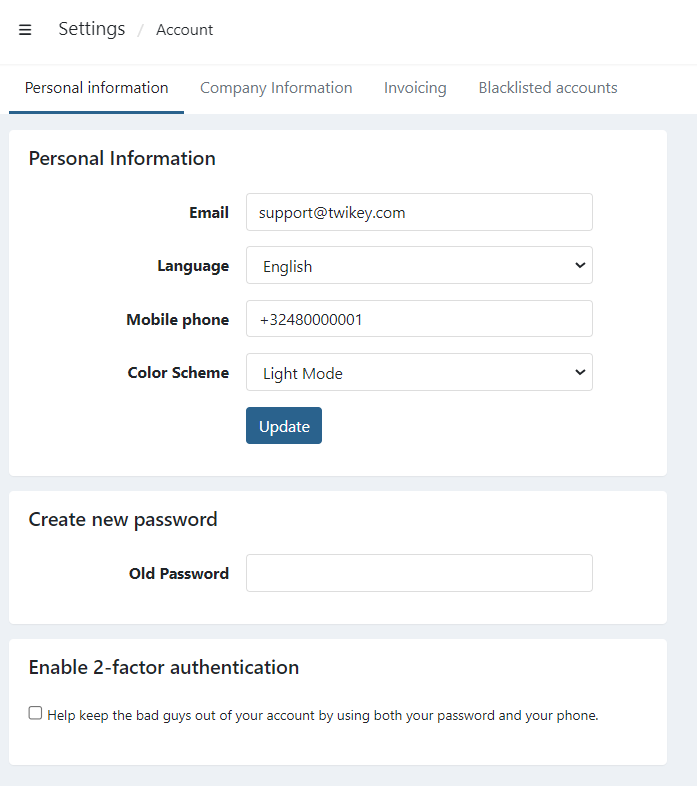
You can also access this menu anywhere in our Twikey environment when clicking on your username on the top-right corner and choosing Personal information.
Email address
Your email address is used for:
- Account communication and notifications
- Password recovery
- Security alerts (such as login attempts)
Language
Select your preferred language for the platform interface and system notifications.
Notes:
- This setting only affects your personal view.
- Other users in your company can choose their own language independently.
Color Scheme
Choose between Light Mode or Dark Mode or Automatic to adjust the visual appearance of the platform.
This setting is purely personal and does not affect other users.
Create new password
You can update your password at any time by providing:
- Your current password
- A new password of your choice
Security is our top priority
You can find detailed information about our ISO certification, GDPR compliance, PCI-DSS standards, and Privacy Statement on our Security page.
Security recommendations
- Use a strong password with a mix of letters, numbers, and symbols
- Avoid reusing passwords from other tools or platforms
Enable 2-factor authentication
We strongly advise all users to enable two-factor authentication (2FA) to enhance the security of their accounts.
2FA adds an extra layer of protection by requiring not only a password but also a second factor — such as a code from an authentication app — to access the account. This significantly reduces the risk of unauthorized access, even if the user's password is compromised.
Read our Security & Login article to know how to activate two-factor authentication for yourself.
To enforce two-factor authentication for all your users, please contact our support.