
About refunds
- How refunds work in Twikey
- Requirements to manage refunds
- Refund screen overview
- Filtering and searching refund batches
- Notifications
Refunds can be used to fully or partially refund a transaction to a debtor or to perform a credit transfer between accounts.
How refunds work in Twikey
A refund is processed as a payout back to the original payer. Twikey prepares the required refund information and links it to the original transaction. The actual payout is then executed by your bank or payment provider. This ensures that refunds can be easily tracked and reconciled afterwards.
The available method depends on how the original payment was collected:
- Collected via bank (Direct Debit) — refund via your bank account. Twikey groups the refunds into a batch that you send to the bank.
- Collected via a payment provider (for example recurring credit card) — refund via the payment provider, which is sent immediately, or via your bank account if you have a refund-supported bank gateway active.
- Received as a bank transfer (Reconciliation) — when you refund an overpayment or a payment you cannot match from the Matching screen, the refund is added to a pending refund batch. The money is not paid back automatically: you still need to send that batch to your bank before the refund is executed. See How to prepare a refund batch for execution.
Requirements to manage refunds
To manage refunds in Twikey, you must have at least one active payment method.
For more details, see Managing your payment methods.
Refund screen overview
- Navigate to Refunds in the left-hand navigation menu.
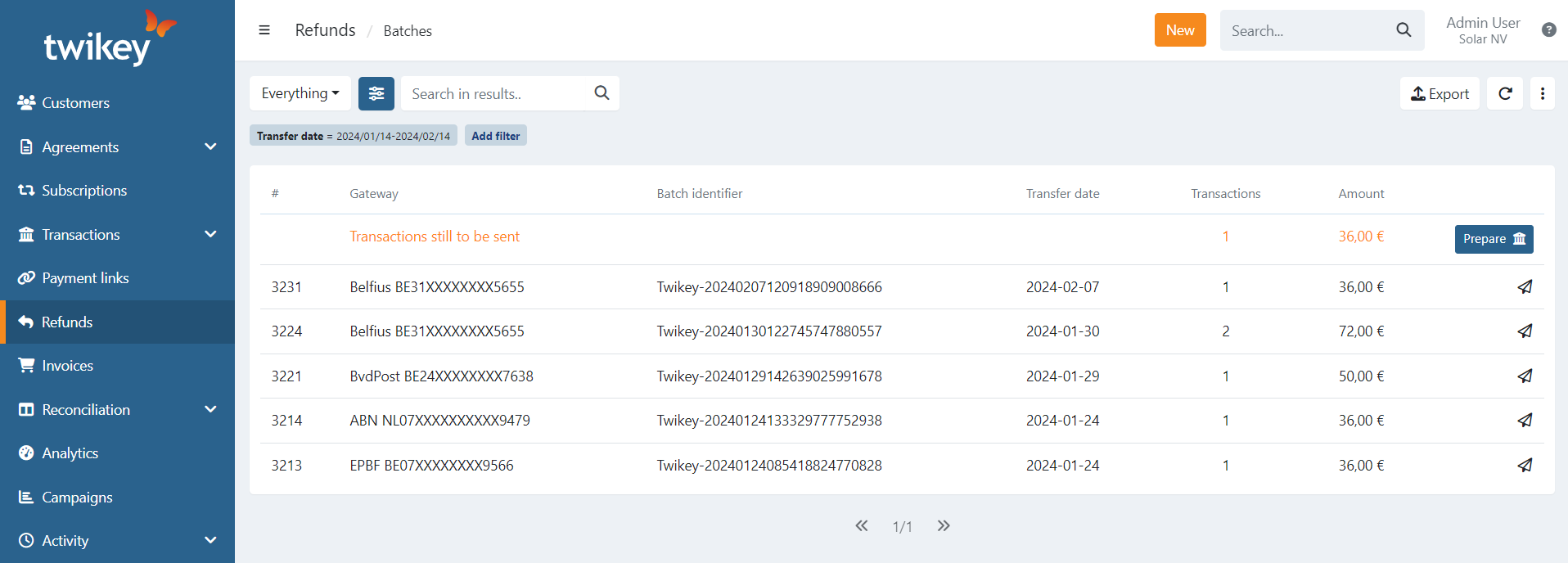
The Batches section provides an overview of all refund batches, including batches that are pending submission to the bank and those that have already been sent.
For sent batches, the overview displays:
- Refund ID
- Gateway (bank account or payment provider) from which the money is debited
- Batch identifier (PmtInfId)
- Transfer date of the refund
- Number of transactions in the batch
- Total amount of the batch
Pending batches are marked with the text Transactions still to be sent and include a Prepare action.
Filtering and searching refund batches
Use the preset and advanced filters to narrow down the list of refund batches:
- Everything – all records
- With feedback – batches that received feedback from the bank
- Feedback missing – batches without bank feedback
- Archived – archived batches
Within the current list of records, you can search for batches using full or partial values for:
- Refund ID (#)
- Gateway
- Batch identifier
- Number of transactions
- Amount (in cents)
Notifications
When a refund batch is created with a total amount above a configurable threshold, Twikey sends a warning email to your company and logs the event in the activity feed. This protects against accidental large payouts.
- Default threshold: €1,000 per batch.
- The threshold can be raised or lowered on request — contact our support team to adjust it.