
Manage beneficiary accounts
- How beneficiary accounts are created
- Add a beneficiary account
- Suspend or reactivate a beneficiary acco...
- What happens when you suspend a benefici...
- Stop refunds while an agreement is suspe...
- Refunds created by your own system or in...
A beneficiary account is the bank account used to pay out a refund to your customer. Twikey stores beneficiary accounts per customer, so you can reuse them across multiple refunds without re-entering the IBAN each time. Every refund via your bank account is paid out to one of these accounts.
Refunds sent via a payment provider (for example a credit card refund) do not use beneficiary accounts. Everything in this article applies to refunds via your bank account only.
How beneficiary accounts are created
Beneficiary accounts are created in two ways:
- Automatically - Every time you create a refund via your bank account, the IBAN you refund to is saved as a beneficiary account on the customer. This applies to refunds created from a transaction, an invoice or credit note, a payment link, the Matching screen in reconciliation, a CSV import, and refunds sent by your own system or integration. When no account is chosen, Twikey uses the IBAN of the agreement, the payment link or the incoming payment.
- Manually - You can add additional beneficiary accounts on the customer detail page.
Add a beneficiary account
- Navigate to Customers in the left-hand navigation menu.
- Click the customer to open the detail page.
- Open the Refunds tab.
- Click the + icon to add a new beneficiary account.
- Enter the IBAN.
- Click Save.
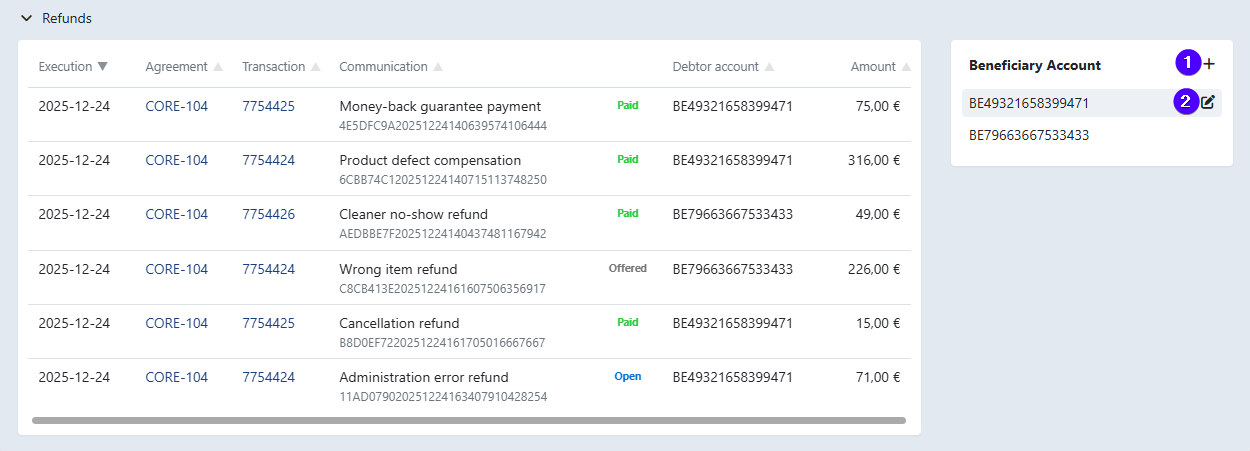
The new account is now available when creating a refund for this customer.
Suspend or reactivate a beneficiary account
Suspend a beneficiary account when no more refunds may be paid out to it, for example when the account is closed or when you want to pause refunds for this customer.
- Navigate to Customers in the left-hand navigation menu.
- Click the customer to open the detail page.
- Open the Refunds tab.
- Click the edit icon next to the beneficiary account.
- Select Suspend or Reactivate as needed.
- Click Save.
Suspended accounts are shown with a strikethrough.
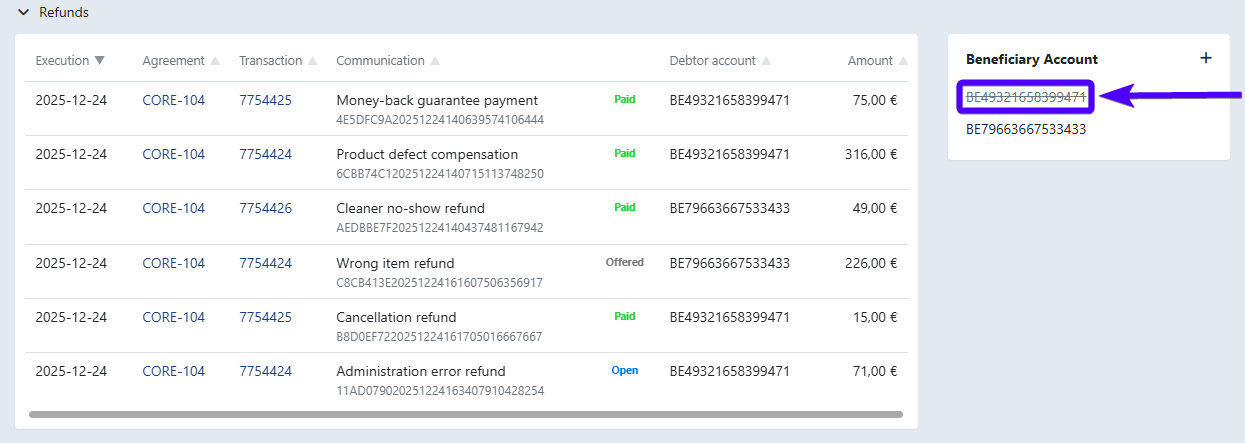
What happens when you suspend a beneficiary account
- New refunds are refused - A new refund to a suspended account fails with the message Refund failed. This applies to every place where you can create a refund via your bank account. Suspended accounts still appear in the account list of the refund screen, so pick another account or reactivate this one first.
- Pending refunds are blocked - Refunds that were already waiting to be sent are not included in the refund batch. They appear as Blocked items when you prepare the batch and stay there until you reactivate the account, move them to another beneficiary account or remove them.
- Refunds from your own system are rejected - When your own system or integration creates refunds for this customer, they are rejected as long as the customer has no other active beneficiary account. Make sure your system handles this error.
- No automatic reactivation - Twikey never reactivates a suspended account on its own, and adding the same IBAN again with the + icon does not work either. Use Reactivate to allow refunds again.
Stop refunds while an agreement is suspended
Suspending (pausing) an agreement stops new collections, but it does not stop refunds. Refunds are linked to the customer's beneficiary account, not to the agreement, so they are still created and paid out to that account.
To pause refunds for this customer as well:
- Suspend the customer's beneficiary account(s) as described above.
- Reactivate the beneficiary account(s) once the agreement is active again.
Refunds created by your own system or integration
When your own system, such as your ERP or accounting software, creates refunds through the Twikey API, it usually only sends the customer number. In that case Twikey books the refund on the customer's first active beneficiary account. The state of the customer's agreement is not taken into account.
Only when the customer has no beneficiary account yet does Twikey create one from an active agreement of that customer. A suspended agreement is not used for this, and a suspended beneficiary account is never recreated this way.