Reconciliation of Direct Debit transactions
How to reconcile Direct Debit batches in your accounting package
When you send a collection file to the bank, the bank will return a CAMT, CODA or MT940 file to you after execution.
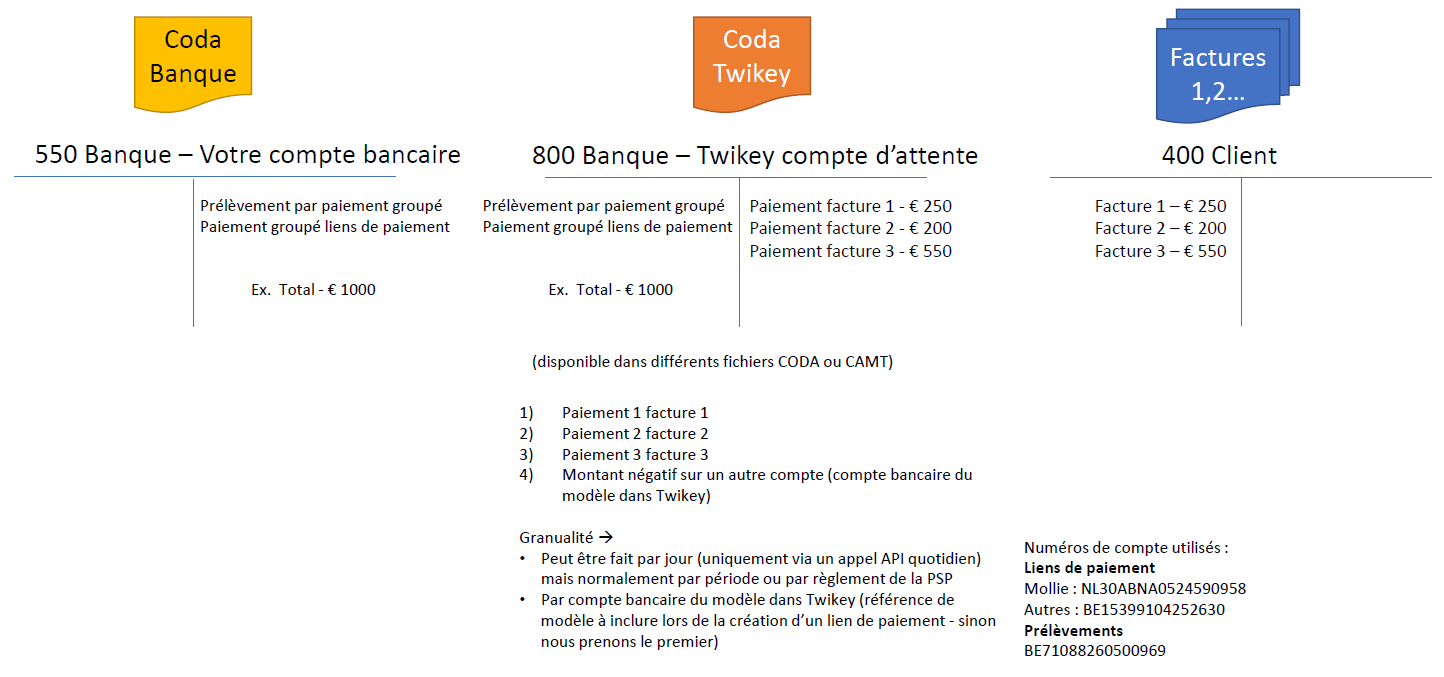
The problem is that this file only gives you the total amount that has been collected and not the individual amounts per invoice.
The bank file only mentions individual amounts when a transaction could not be collected, all successful transactions are grouped into one amount.
To reconcile the transactions in your accounting package with the payments made, each transaction would have to be reconciled manually.
You can automate this process through a reconciliation file generated in your environment
and a temporary account in your accounting package. All you need to do is the following:
- Navigate to the reconciliation menu (only available as controller)
- Click on Generate and select the type and the option Direct Debit
- Select your desired file type and click on Download (2)
- Import the reconciliation file in your accounting package
- The collected amounts will now automatically be reconciled with your individual transactions
In most cases, the temporary account BE71088260500969 will automatically be created when you import the file in your accounting package.
If this is not the case, you can add it yourself.
We strongly suggest you to upload each reconciliation file in your accounting package only once, to avoid overwriting existing data.
Example
You sent a collection file to the bank to collect three invoices of respectively 10, 20 and 30 euros.
After this successful collection has been executed, the bank sends you a feedback file (CAMT/CODA/MT940) with a grouped amount of €60.
You now have to reconcile this amount with the three separate invoices.
By following the steps above, you generate the reconciliation file that has to be imported into your accounting package.
The file handles the total collection amount of €60 as a negative amount and adds the individual amount of each invoice (10, 20 and 30 euros) as a positive amount.
This way the corresponding invoices will be reconciled automatically.
Facturen afpunten in uw boekhoudpakket in België
Wanneer u een inningsbestand naar de bank stuurt, zal de bank u na uitvoering daarvan een CAMT-, CODA- of MT940-bestand terugsturen.
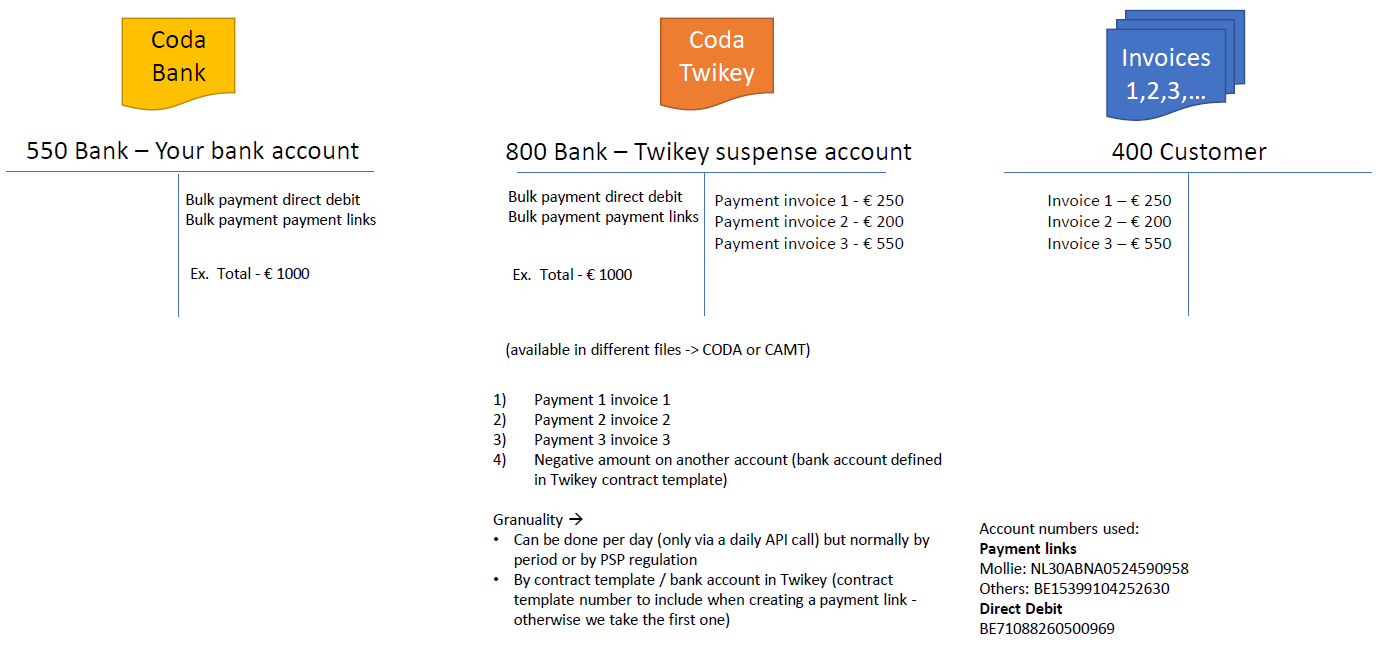
Het probleem is dat dit bestand alleen het totale geïnde bedrag vermeldt en niet het individuele bedrag per factuur.
Het bankbestand vermeldt alleen individuele bedragen wanneer een transactie niet kon worden geïnd; de succesvolle transacties worden gegroepeerd in één bedrag.
Om deze facturen in uw boekhoudpakket te reconciliëren met de uitgevoerde betalingen, zou elke factuur handmatig afgepunt moeten worden.
U kan dit proces automatisch laten verlopen door middel van een afpuntingsbestand gegenereerd in uw omgeving
en een wachtrekening in uw boekhoudpakket. Hiervoor hoeft u alleen het volgende te doen:
- Ga naar Afpunten > Bestanden
- Klik op Genereren en selecteer het type en de optie SDD
- Selecteer het gewenste bestand en klik op Download (2)
- Importeer het afpuntingsbestand in uw boekhoudpakket
- De geïnde bedragen worden nu automatisch gereconcilieerd met uw individuele facturen
Bij de import van het bestand in uw boekhoudprogramma wordt de wachtrekening BE71088260500969 in de meeste gevallen automatisch aangemaakt.
Indien dit niet het geval is, kunt u deze zelf toevoegen.
We raden ten sterkste aan om elk afpuntingsbestand slechts één keer in uw boekhoudpakket te importeren, om te voorkomen dat bestaande gegevens worden overschreven.
Voorbeeld
U heeft een inningsbestand naar de bank gestuurd om drie facturen van respectievelijk 10, 20 en 30 euro te innen.
Na de succesvolle inning stuurt de bank u een feedbackbestand (CAMT / CODA / MT940) met een gegroepeerd bedrag van €60.
Dit bedrag dient u nu te reconciliëren met de drie afzonderlijke facturen.
Door bovenstaande stappen te volgen, genereert u het afpuntingsbestand dat in uw boekhoudpakket geïmporteerd moet worden.
Het bestand behandelt het totale inningsbedrag van €60 als een negatief bedrag en voegt het individuele bedrag van elke factuur
(10, 20 en 30 euro) toe als een positief bedrag. Op deze manier worden de facturen automatisch afgepunt.
Facturen afletteren in uw boekhoudpakket in Nederland
Wanneer u een incassobestand naar de bank stuurt, zal de bank u na uitvoering daarvan een CAMT- of MT940-bestand terugsturen.
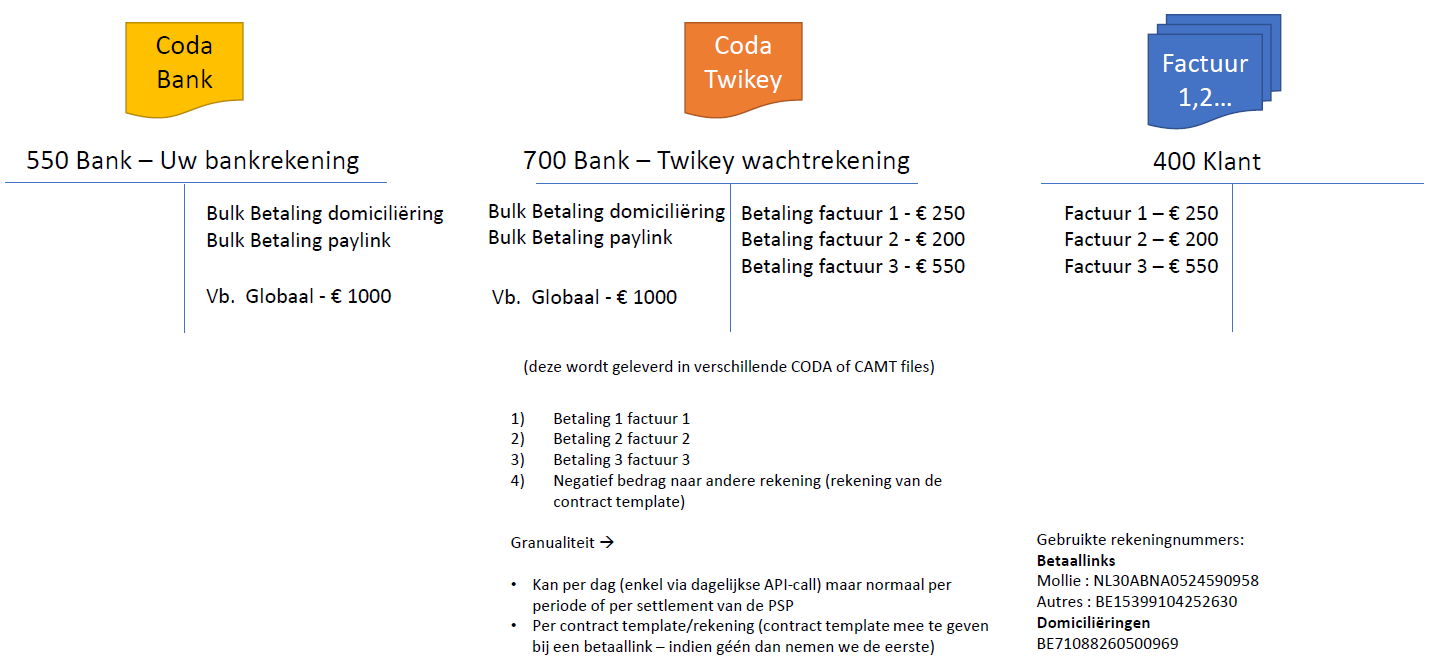
Het probleem is dat dit bestand alleen het totale geïncasseerde bedrag vermeldt en niet het individuele bedrag per factuur.
Het bankbestand vermeldt alleen individuele bedragen wanneer een transactie niet kon worden geïncasseerd.
De succesvolle transacties worden gegroepeerd in één bedrag.
Om deze facturen in uw boekhoudpakket te reconciliëren met de uitgevoerde betalingen, zou elke factuur handmatig afgeletterd moeten worden.
U kan dit proces automatisch laten verlopen door middel van een afletteringsbestand gegenereerd in uw omgeving
en een wachtrekening in uw boekhoudpakket. Hiervoor hoeft u alleen het volgende te doen:
- Ga naar Afletteren > Bestanden
- Klik op Genereren en selecteer het type en de optie SDD
- Selecteer het gewenste bestand en klik op Download (2)
- Importeer het afletteringsbestand in uw boekhoudpakket
- De geïnde bedragen worden nu automatisch gereconcilieerd met uw individuele facturen
Bij de import van het bestand in uw boekhoudprogramma wordt de wachtrekening BE71088260500969 in de meeste gevallen automatisch aangemaakt.
Indien dit niet het geval is, kunt u deze zelf toevoegen.
We raden ten sterkste aan om elk afletteringsbestand slechts één keer in uw boekhoudpakket te importeren, om te voorkomen dat bestaande gegevens worden overschreven.
Voorbeeld
U heeft een incassobestand naar de bank gestuurd om drie facturen van respectievelijk 10, 20 en 30 euro te innen.
Na de succesvolle incasso stuurt de bank u een feedbackbestand (CAMT / MT940) met een gegroepeerd bedrag van €60.
Dit bedrag dient u nu te reconciliëren met de drie afzonderlijke facturen.
Door bovenstaande stappen te volgen, genereert u het afletteringsbestand dat in uw boekhoudpakket geïmporteerd moet worden.
Het bestand behandelt het totale incassobedrag van €60 als een negatief bedrag en voegt het individuele bedrag van elke factuur
(10, 20 en 30 euro) toe als een positief bedrag.
Op deze manier worden de facturen automatisch afgeletterd.
Comment réconcilier des factures dans votre logiciel comptable
Lorsque vous envoyez un fichier de prélèvement à la banque, la banque vous renvoie un fichier CAMT, CODA ou MT940 après l'exécution.
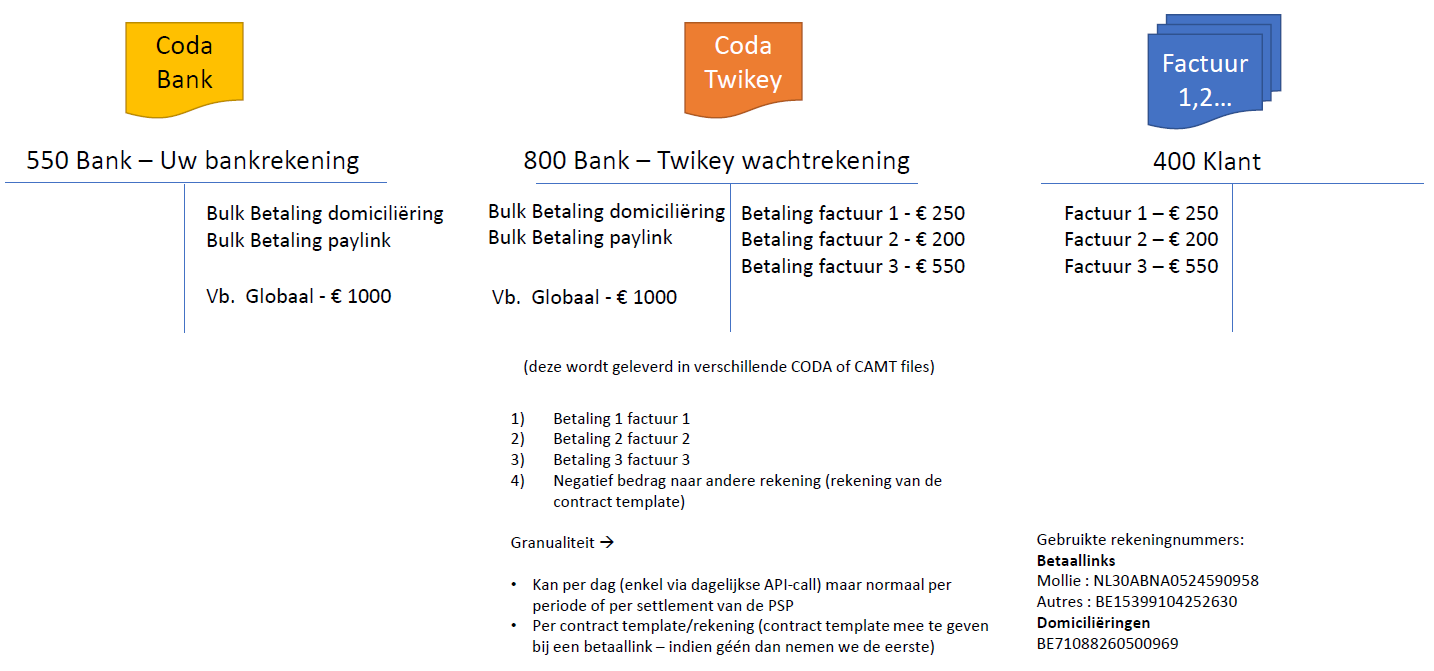
Le problème avec ce fichier est qu'il ne vous donne que le montant global qui a été encaissé et pas le montant individuel par transaction.
Le fichier bancaire mentionne uniquement les montants individuels lorsqu'une transaction n'a pas pu être encaissée.
Les transactions qui ont pu être encaissées sont regroupées en un seul montant.
Pour réconcilier ces transactions reprises dans votre logiciel comptable avec les paiements effectués, elles doivent être réconciliées manuellement.
Vous pouvez automatiser ce processus grâce à un fichier de lettrage généré dans votre environnement
et un compte temporaire dans votre logiciel comptable. Vous n'aurez plus qu'à faire les choses suivantes :
- Ouvrez le menu Lettrage > Fichiers
- Cliquez sur Générer et sélectionnez le type et l'option SDD
- Sélectionnez le type de fichier de votre choix et cliquez sur Décharger (2)
- Importez le fichier de lettrage dans votre logiciel comptable
- Les montants encaissés sont réconciliés automatiquement avec vos factures individuelles
Dans la plupart des cas, le compte temporaire BE71088260500969 sera automatiquement créé lorsque vous importez le fichier dans votre progiciel de comptabilité.
Si ce n'est pas le cas, vous pouvez l'ajouter vous-même.
Nous vous suggérons fortement de ne télécharger le fichier de lettrage qu’une seule fois dans votre logiciel de comptabilité, afin d’éviter d’écraser des données existantes.
Exemple
Vous avez envoyé un fichier de prélèvement à la banque pour encaisser trois factures de respectivement 10, 20 et 30 euros.
Après l’exécution réussie, la banque vous envoie un fichier en retour (CAMT / CODA / MT940) avec un montant groupé de €60.
Vous devez à présent associer ce montant groupé aux trois factures.
En suivant les étapes ci-dessus, vous générez le fichier de réconciliation à importer dans votre logiciel comptable.
Le fichier traite le montant total de €60 comme un montant négatif et ajoute le montant individuel de chaque facture (10, 20 et 30 euros) comme un montant positif.
De cette manière, les paiements sont automatiquement associés aux factures correspondantes.