
Payment link details
- Payment link states
- Share tab
- Details tab
- Refunds tab
- Why a payment link cannot be marked as p...
- What to do with an expired payment link
- What to do with a declined payment link
Click a payment link in the overview to open its details. Depending on the state, a panel with two or three tabs appears.
Payment link states
- Created - the payment link has been created but not yet opened by the customer.
- Clicked - the payment link has been opened but not yet paid.
- Paid - the payment link has been paid.
- Expired - the expiry date has passed with no payment received.
- Declined - the last payment attempt was not completed. The customer cancelled the payment, a problem occurred during payment, or the payment session at the payment provider expired without a payment (for example a Payconiq QR code that was not scanned in time).
Share tab
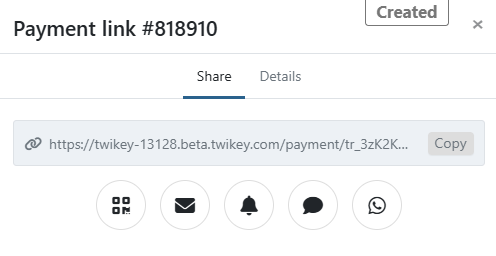
Send the payment link to the customer. Learn more about it here.
This tab is available for payment links in the following states: Created, Clicked, Expired, and Declined.
Details tab
Shows the key details of the payment link. Always available regardless of state.
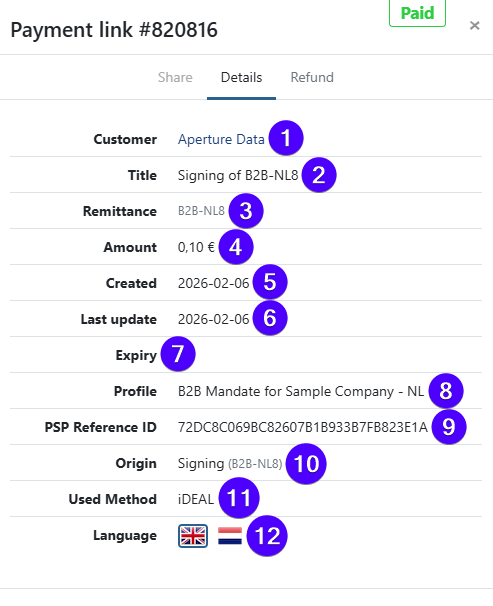
- (1) Customer — the targeted customer.
- (2) Title — the payment description shown to the customer.
- (3) Remittance — the payment reference.
- (4) Amount — the payment amount.
- (5) Created — the creation date.
- (6) Last activity — the date of the most recent event.
- (7) Expiry — the expiry date, if set.
- (8) Profile — the profile used for this payment link.
- (9) PSP Reference ID — the reference ID from the payment service provider.
- (10) Origin — how the payment link was created (see below).
- (11) Payment method — the method used by the customer to pay.
- (12) Language — the language shown to the customer on the payment page.
Origin indicates the source of the payment link. Possible values:
- API — created via API. If a
X-PARTNERheader was included, the partner name is shown in brackets. - First payment — used to authenticate an agreement as a first payment.
- Dunning — created by a dunning step, linked to a failed transaction via automated dunning, a manual dunning action, or the API using the
txrefparameter. - Invoice — originated from an invoice.
- Credit Card Renewal — created via a task to renew a recurring credit card agreement.
Origin is only shown if the payment link was created through one of the methods above.
Refunds tab
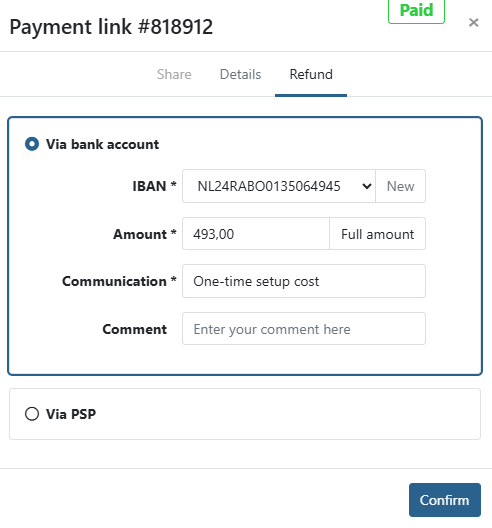
Refund a paid payment link, partially or entirely. This tab is only available for payment links in the Paid state.
If no refund has been sent yet:
If one or more refunds have already been sent:
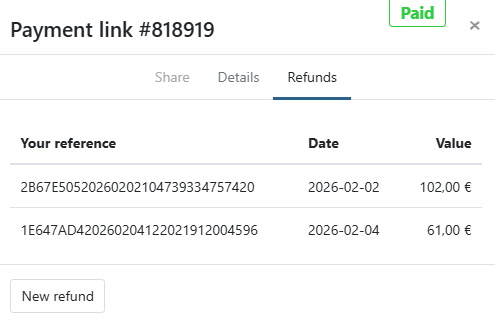
Learn more about refunding a payment link.
Why a payment link cannot be marked as paid
A payment link cannot be marked as paid manually. The state is set automatically when the payment provider confirms the payment.
If the customer paid another way, for example by bank transfer, update the related invoice instead. See Mark invoice as paid.
What to do with an expired payment link
An expired payment link cannot be reactivated. Create a new payment link for the customer and send it again. When creating it, set an expiry date that leaves the customer enough time to pay.
What to do with a declined payment link
A Declined state means the last payment attempt via the payment link was not completed: the customer cancelled it, a problem occurred during the payment process, or the payment session at the payment provider expired.
Declined does not mean the invoice is unpaid. The customer can still pay in another way, for example by bank transfer. If the payment link belongs to an invoice, always check the state of the invoice itself.
A declined payment link is not final. As long as the payment link has not expired or been archived, the customer can open the same link again and still pay. The state then changes to Paid.
Open the payment link details and check the events for more information. If the problem is on the payment provider's side, contact Twikey Support with the PSP Reference ID shown in the Details tab.