
Monitor Peppol invoice delivery status
- What happens after a failed delivery
- Automatic retry on delivery failure
- Common Peppol delivery errors
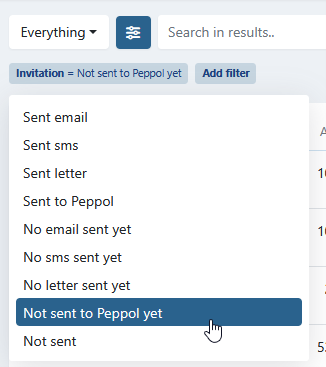
To filter which invoices are sent, not yet sent or failed on Peppol, use the filters in the invoices menu:
- Navigate to Invoices in the left-hand navigation menu.
- Set the Delivery channel filter to Peppol.
- Set the Delivery status filter to Sent, Not sent or Failed.
When both filters are set, the status applies to the Peppol delivery only. For example, Failed with Peppol shows the invoices where the Peppol delivery failed, even if an email was sent successfully for the same invoice.
The icons at the end of each row show the delivery per channel:
- Red warning triangle - At least one delivery of this invoice failed.
- Green icon - For Peppol and letter: the delivery was accepted. For email and SMS: the invoice was sent on that channel.
- Red icon - The Peppol or letter delivery failed. Hover over the icon to see the status.
- Light icon - The Peppol or letter delivery is still pending, or this is the preferred delivery method of the invoice and nothing was sent yet.
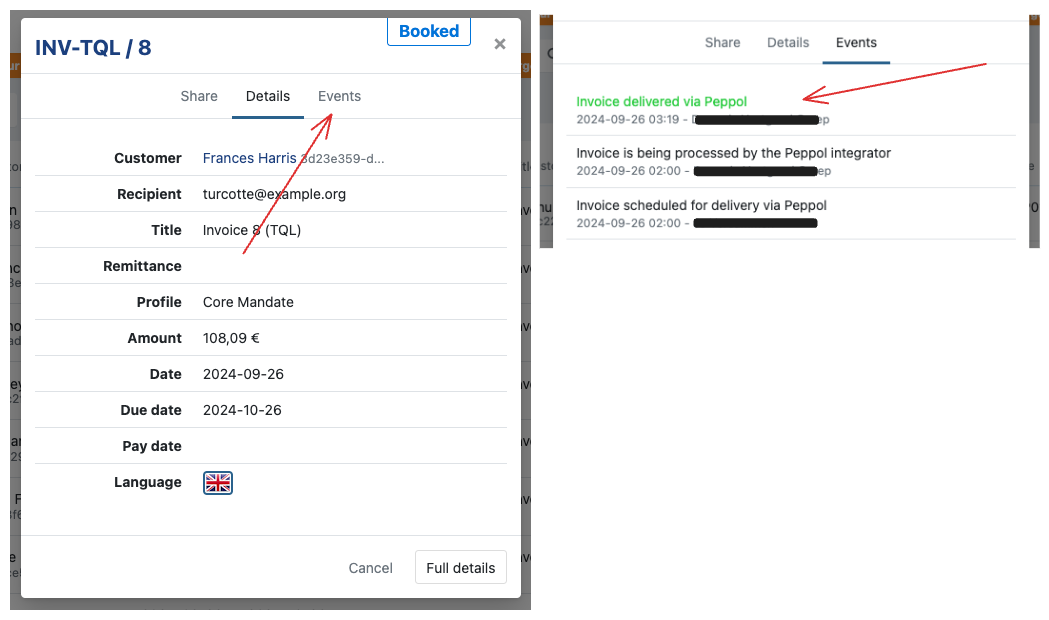
Once you've sent an invoice through the Peppol network, you can track its delivery status and check for any issues in the invoice audit trail.
To access this navigate to:
- the Invoice overview and click on the invoice
- Open the "Events" tab to view the full audit trail
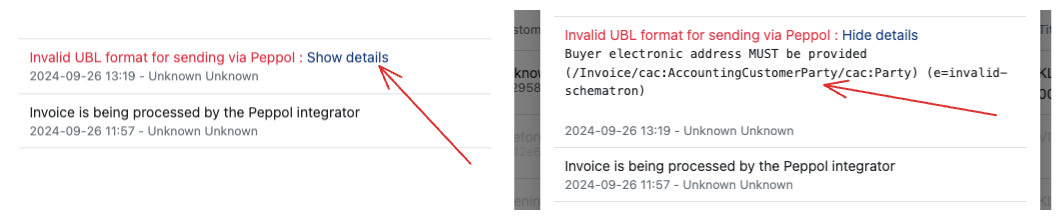
If something went wrong you can also see this in the audit trail.
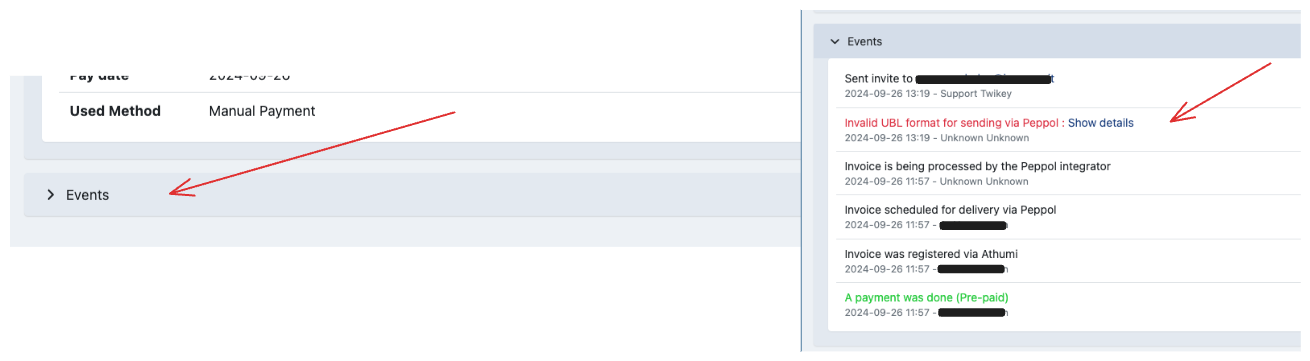
You can also get to the audit trail of an invoice in the details window of an invoice by opening the "Events" collapsable.
What happens after a failed delivery
Twikey does not send the invoice by email when a Peppol delivery fails. This applies to every way of sending: automatic sending when an invoice is booked, sending by customer preference, sending a single invoice, bulk sending and sending through the API. Before 20 October 2026, Twikey automatically sent the standard invoice email after a failed Peppol delivery in some of these cases. This no longer happens.
For each failed delivery, choose how to continue:
- Resend via Peppol - Correct the cause first (for example the Peppol identifier of the customer), then resend the invoice via Peppol.
- Send by email - Send the invoice by email to customers that cannot receive it via Peppol.
Automatic retry on delivery failure
When a Peppol delivery fails, Twikey automatically retries sending the invoice in the background before surfacing an error. Up to 4 delivery attempts are made silently — none of the intermediate retry attempts are individually visible in the audit trail.
Only after all 4 attempts have failed does a delivery failure event appear in the audit trail. At that point, no further automatic retries will occur. You can resend the invoice manually via Peppol.
Common Peppol delivery errors
When a delivery fails, the error is shown in the invoice audit trail. These are the errors you are most likely to see.
error-general
A problem at the receiver's access point — for example a misconfiguration, a temporarily high invoice volume, or another transient issue. By the time this error appears, all four automatic delivery attempts have been made. The only next step is to resend the invoice manually via Peppol.
is not registered in SML
The UBL contains incorrect data for the receiving party. The receiver is registered on the Peppol network under a different scheme ID than the one used — for example only under their KBO number. Verify the correct Peppol identifier for the receiver, update the customer record, and resend.
Unable to fetch [access point URL] — error-customer-access-point-issue
A temporary problem with the receiver's access point. This is not specific to invoices sent through Twikey: it affects every sender trying to reach that access point. If the problem persists, the receiver should contact their own access point provider.
invalid status code=404
Peppol reached the receiver's access point, but the access point could not deliver the UBL. Possible causes:
Wrong UBL version — the receiver's access point is not configured for the UBL version being sent, for example configured for UBL 2.1 only but receiving UBL 3.
Receiver no longer active — the receiver still appears in the Peppol directory but has cancelled their account and is no longer reachable.
Temporary access point issue — a transient problem at the receiver's access point, for example a broken VAT mapping.
In all cases the issue is on the receiver's side. If the problem persists, the receiver should contact their access point provider.