
Sending invoices using "Send by preference"
After the invoices are uploaded, I manually select my invoices. Twikey handles the distribution channel, depending on my setup.
For this case, you can select the invoices that you want to send out.
Twikey sends each invoice via the delivery method that applies to it: the method set on the customer, or otherwise your company default.
We recommend that the default method is Peppol.
For invoices where the delivery method is Peppol, the following rules apply:
- If successful, Twikey sends the "Invoice via Peppol" email, when this email is enabled (see "Next steps after Peppol activation").
- If unsuccessful (for example the customer is not reachable on Peppol, no UBL is available, or a Peppol error occurs), the invoice is not sent by email instead. Invoices that cannot be handed over to Peppol are skipped, the other selected invoices are still sent. A failure reported later by the Peppol network is shown as a failed Peppol delivery on the invoice.
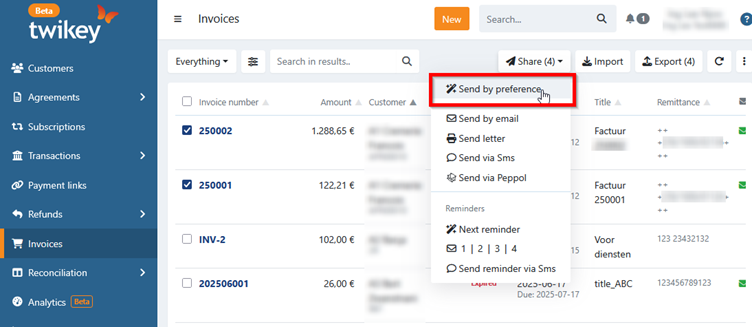
To do this follow these steps:
- Navigate to the "Invoices" menu
- Filter the list
- Use the advanced filter, select "Reachable on Peppol" and set it to "True"
- Since an UBL is necessary, also select "UBL available" and set it to "True"
- Use other filters to compile the correct list. Several items are available like invoice number, different dates, amounts and many other.
- Select the invoices you want to send using the checkboxes or use the top check box to select all.
- Click the Share button and select Customer preference under Send using (a popup will appear to confirm your action).
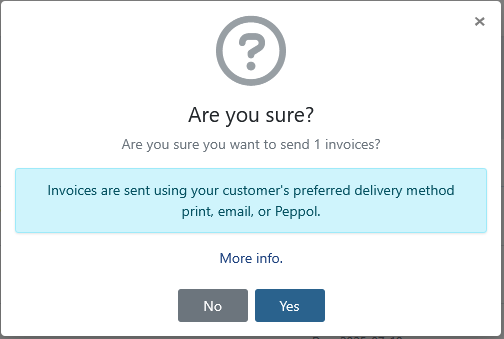
⚠️Important
If you accidentally select invoices without an UBL or without invoice lines for a customer with Peppol as delivery method, those invoices cannot be sent via Peppol and are not sent by email either.
To avoid this, always filter your invoice list via the advanced filter selecting also "UBL available" and set it to "True".
Customers whose delivery method is email (for example private persons) still receive the invoice by email.