
Next steps after Peppol activation
- Peppol reachability of your customers
- Choose your default sending method
- Customer e-mail delivery options
Peppol reachability of your customers
All new customers will be checked daily to verify if they are Peppol reachable.
The first check happens when Peppol is activated on your account. Twikey then periodically synchronises with the official Peppol directory to keep the reachability data up to date. If a customer appears incorrectly marked as reachable or not reachable, this is corrected automatically on the next update.
Choose your default sending method
You can choose which method - e-mail or Peppol - is used by default for all of your customers.
This will ensure that first we use this method as standard.
You can set-up your default sending method:
- Settings
- Account
- Company
- Invoice delivery method
- Choose Peppol
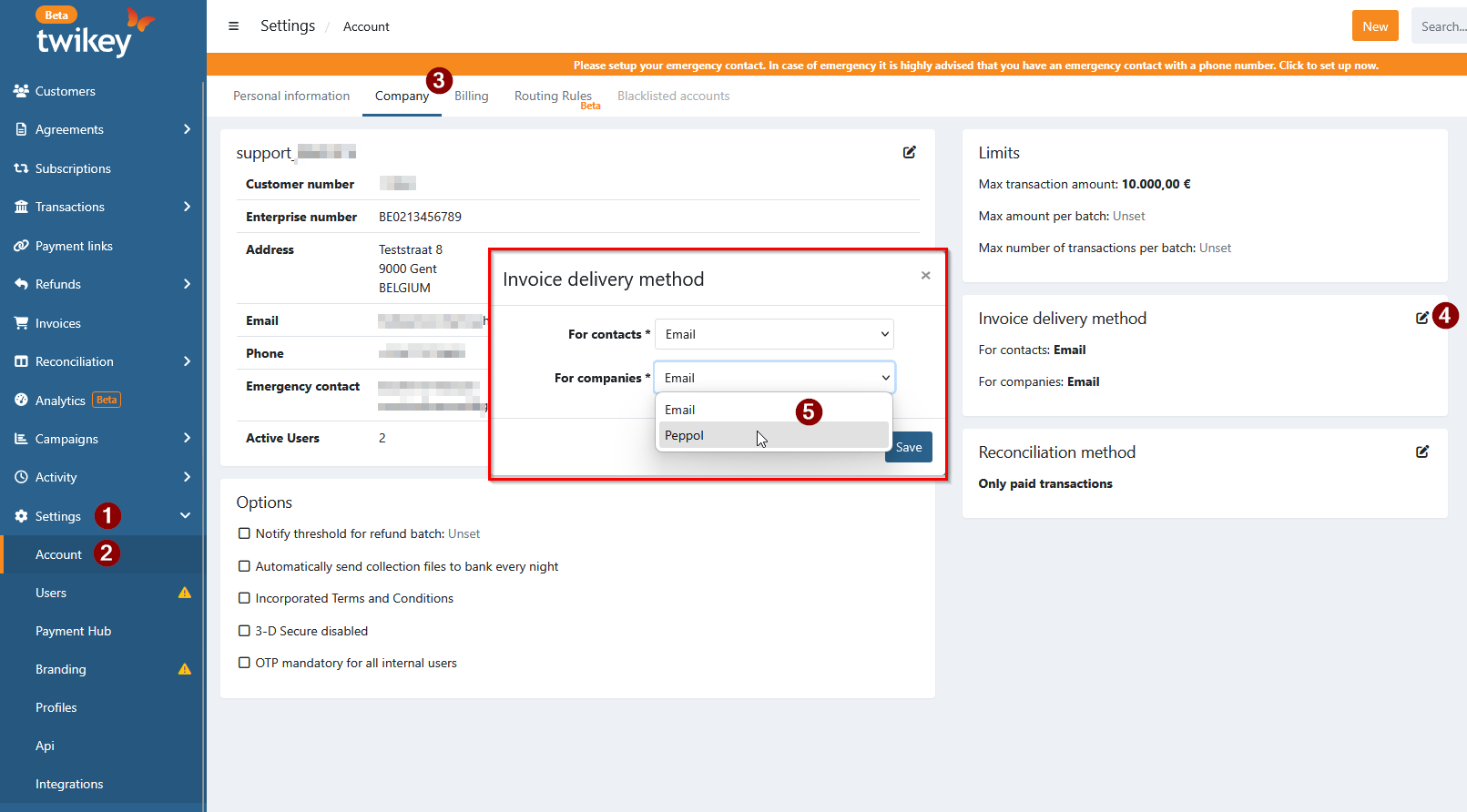
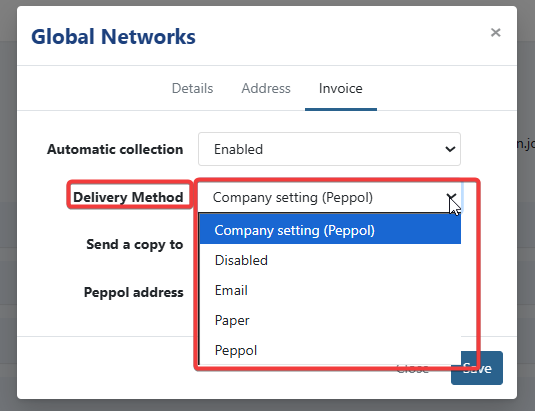
When an invoice of a specific customer has to be sent trough another method , you can change it per customer.
Navigate to the customer via:
- Customers
- Select a customer
- Edit
- Invoice
- Delivery method (Company setting/Disabled/Email/SMS/Paper/Peppol).
Customer e-mail delivery options
Depending on your case Twikey can send email to your customers.
Please choose one of the following possibilities:
I'm using only the Peppol delivery
I only want to send my invoices to Peppol. I don't want to send any mail via Twikey.
In the Peppol integration module, leave the checkbox Notify customers when documents are sent via Peppol unchecked.
You do not need to setup the mails.
I'm using the Peppol delivery and a mail with payment button
I would like to use Twikey to send my invoices via Peppol and have Twikey send my clients an informative email with a payment button.
Twikey then sends the "Invoice via Peppol" email to your customer after each successful Peppol delivery. Two settings are needed for this: the checkbox in the Peppol integration, and the email template on the profile.
Step 1: Enable the email in the Peppol integration
- Navigate to Settings > Integrations in the left-hand navigation menu.
- Click the Peppol integration.
- Open the Configuration tab.
- Check Notify customers when documents are sent via Peppol.
- Click Save.

Step 2: Enable the email template on the profile
This template notifies customers about their invoice and provides a convenient link for immediate payment.
- Navigate to Settings > Profiles in the left-hand navigation menu.
- Click the profile used for your invoices.
- Open the Emails tab.
- Select Invoice via Peppol under Invoices. A struck-through name means the email is disabled.
- Click Enable if the email is disabled. Click Edit to change the text of the email.
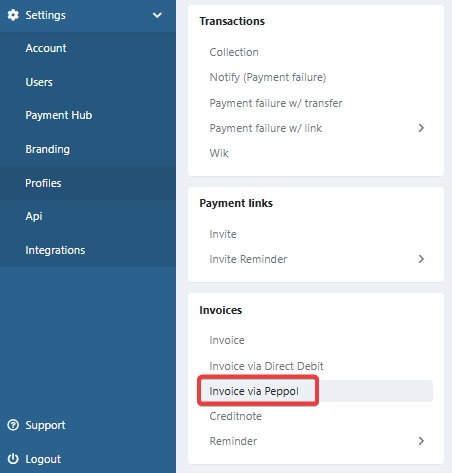
For credit notes, enable the Credit Note via Peppol email in the same way.
What your customer receives
- The email is only sent after a successful Peppol delivery. When the Peppol delivery fails, no email is sent.
- The email is only sent when a valid email address is known for the invoice or the customer.
- There is no PDF of the invoice attached in the mail to avoid possible double bookings in your systems, even when the profile is set to attach the PDF to invitation emails.