
Automated Peppol invoice delivery
After I uploaded my invoices, they should be sent immediately via the default or customers preferred method.
All uploaded invoices are sent directly without any manual intervention!
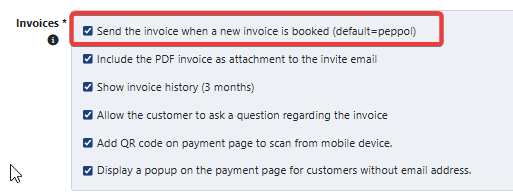
For this setup, check the box at
- Settings
- Profiles
- Invoices
- Submenu invoices
- Send the invoice when a new invoice is booked (default: Company setting). The company setting is the invoice delivery method of your company, for example Peppol or email.
If you want to set the default sending for your company to Peppol, contact Twikey support.
What happens when an invoice is booked
Twikey sends each new invoice via the delivery method that applies to it: the method set on the invoice, otherwise the method set on the customer, otherwise your company default. Your company default only applies to customers that are companies. Customers that are private persons always receive the invoice by email, unless you set a different delivery method on the customer itself.
When the delivery method is Peppol, the result determines what happens next:
- Successful delivery on Peppol - Twikey sends the "Invoice via Peppol" email, but only when the checkbox "Notify customers when documents are sent via Peppol" is enabled in the Peppol integration and the "Invoice via Peppol" email is enabled on the profile. This email never contains the PDF of the invoice.
- Unsuccessful delivery on Peppol - Twikey does not send the invoice by email instead. The failed delivery is shown in the Events tab of the invoice, and you can find all these invoices with the Delivery status filter set to Failed.
See "Monitor Peppol invoice delivery status" in the related articles for how to find failed deliveries and what the most common errors mean.
Remarks
- If you want to send an invoice through SMS or postal service, you need to set up the correct module. Extra costs may be applicable depending on the chosen service.
- Invoices sent by email need a valid email address on the invoice or the customer. Without one, the email invoice cannot be delivered.