
How to view the details of a single invoice
Show me
By clicking on the invoice number in the invoice overwiew, you can open the full details of your invoice or credit note. This is useful when you need to verify delivery information, check the current state of a specific invoice, or review fields not visible in the overview list.
Invoice information
The detail page shows a summary bar at the top with the key fields at a glance — amount, due date, recipient, phone number, and profile — followed by a full invoice information section below.
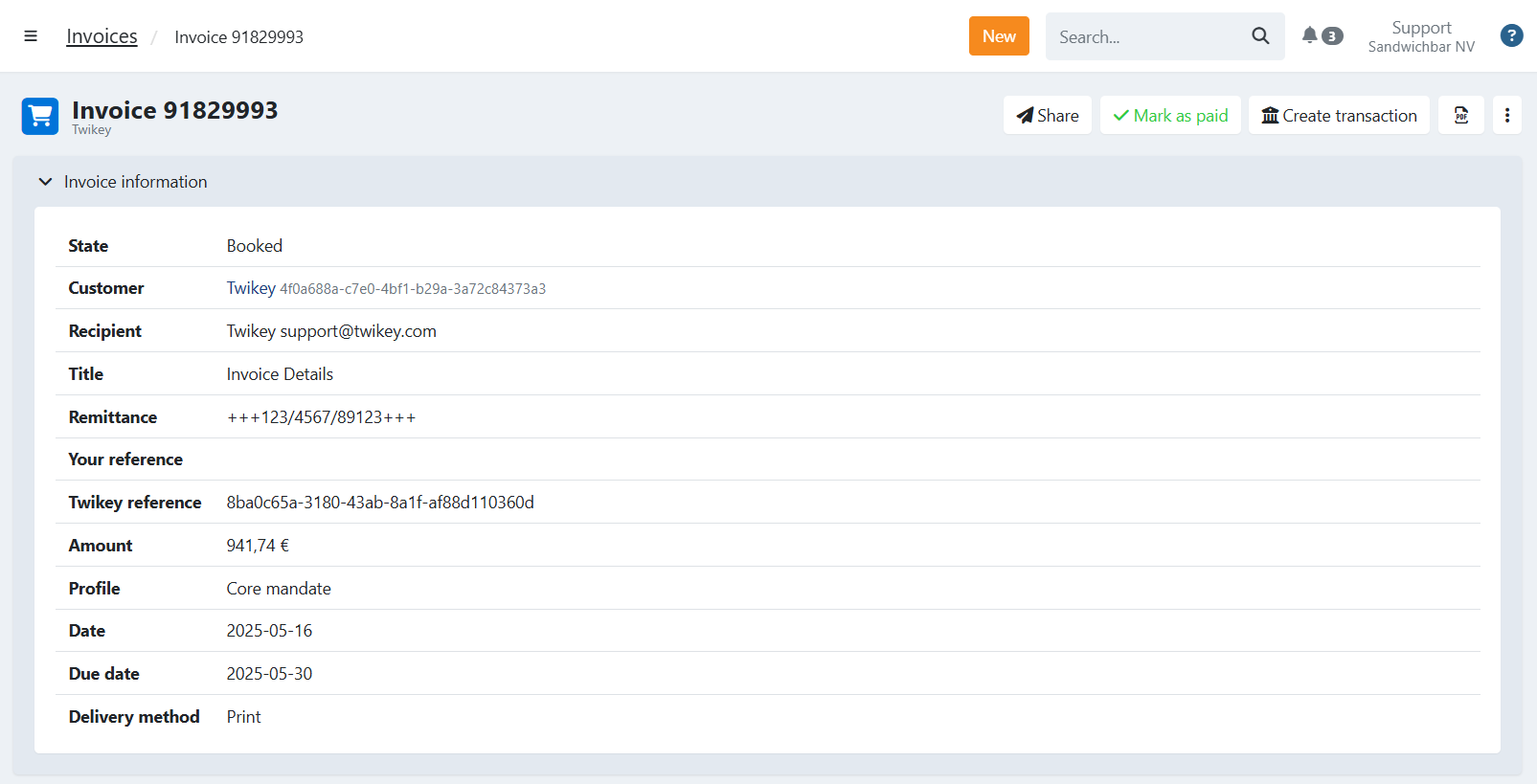
The following fields are displayed in the Invoice information section:
- Invoice number — The unique identifier of the invoice.
- Invoice ID — The internal Twikey GUID for this invoice. This is useful when referencing the invoice via the API or when contacting support.
- Reference — Your own internal reference, used to link the invoice to your internal system (e.g. your ERP or CRM).
- PO number — An optional purchase order number provided by the buyer. When present, it is shown on the invoice detail page, printed in the PDF header, and included in the Peppol/UBL file as the buyer reference. Set via the API or automatically carried over from Recurly subscriptions.
- State — The current payment status of the invoice (Booked, In Progress, Paid, Expired, Archived).
- Amount — The total amount of the invoice.
- Date — The invoice date. This is the date provided when the invoice was created or imported — not the date it was registered in Twikey.
- Due date — The date by which payment is due. The invoice payment link remains valid even after this date.
- Pay date — The date on which the invoice was paid. Only shown when the state is Paid.
- Used Method — The payment method used to pay the invoice (e.g. Direct Debit, Payment link). Only shown once the invoice has been paid.
- Recipient — The actual recipient of the invoice email. This may differ from the customer's email address if a specific recipient was set during invoice creation.
- Message — The message displayed to the customer on their bank statement or payment page. This is derived from the invoice title or the message template defined on the profile.
- Remittance — Your internal reference or communication returned on reconciliation files and the customer's account statement. When the value is a valid structured message or OGM (Belgium), it is formatted as
+++123/4567/89123+++. If the remittance and the paid amount both match, an incoming wire transfer is automatically matched to this invoice. For this automatic matching to work, your bank account must be connected to Twikey (via a bank integration or a power of attorney). - Profile — The payment profile used for this invoice, which determines the available payment options for the customer.
- Language — The language used for invitations and reminders sent for this invoice. Determined by the customer's preferred language, the profile's enabled languages, and any language set at invoice level during import or via API.
- Delivery method — The channel used to deliver the invoice (Email, Print, Disabled, Peppol).
One of the following labels may be shown:(Company): The default delivery method of the company was used.(Customer): The delivery method is inherited from the customer's configuration.(Invoice): A specific delivery method was set directly on this invoice (e.g. via API or import).
Customer information
On the right side of the Invoice information section, the linked customer's details are displayed name, customer number, address, phone number, and email address.
Events
Below the invoice information, the Events section shows a chronological log of all activity on this invoice. Each event includes a timestamp and the user or system that triggered it. Typical events include:
- Invoice was registered (manually, via API, or via import)
- A transaction was created
- An invitation was sent to the customer
- A payment was received
This log is useful for auditing and for tracing exactly when and how an invoice was processed.