
How to delete an invoice
Why you would delete an invoice
Deleting an invoice is appropriate when:
- The invoice was created by mistake and should not exist in the system.
- The invoice contains incorrect customer, amount, or invoice data and cannot be corrected.
- The invoice is a duplicate of another invoice.
- The invoice is part of a failed or aborted process and has no accounting or operational relevance.
Deleting an invoice permanently removes it from the system and should therefore be used with care.
How to delete an invoice
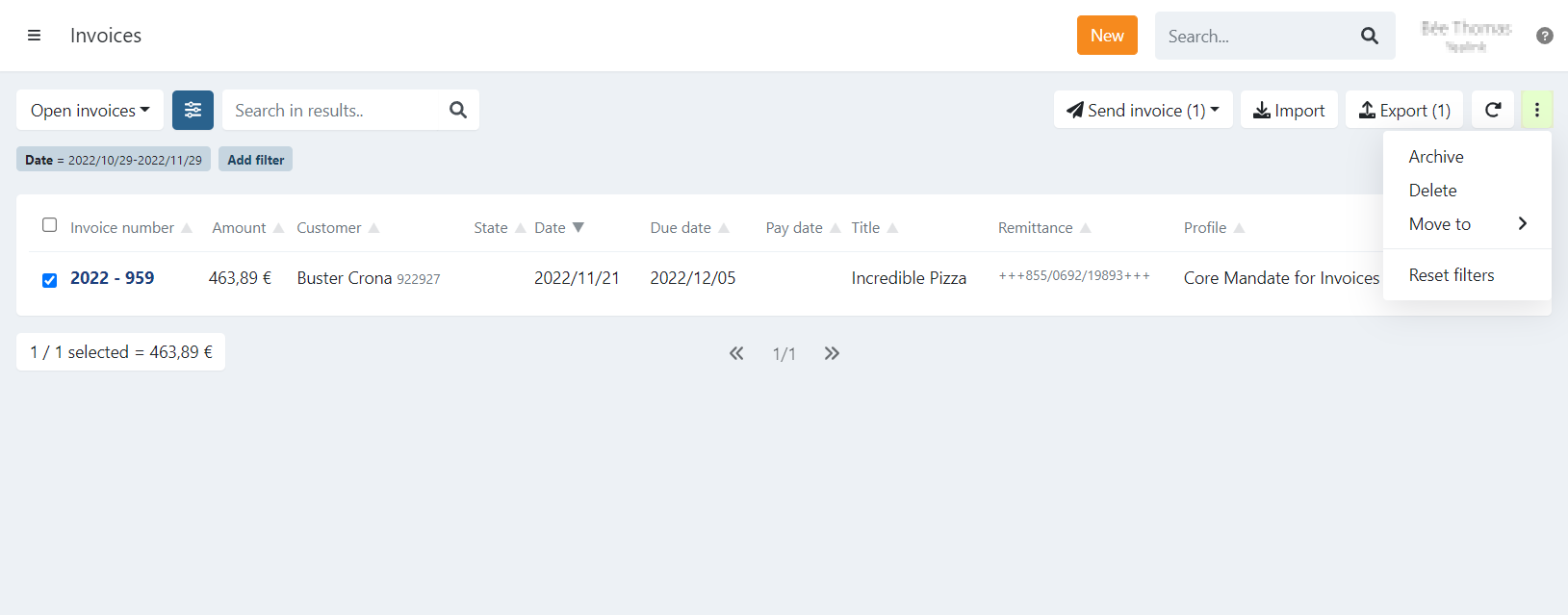
- Navigate to the invoice menu overview
- Select your invoice(s) with the checkbox
- Click Actions in the top-right corner.
- Click Delete
- Confirm with Yes
The selected invoice(s) will be archived.
It is also possible to perform the same action from the details of one invoice.
Click Actions and select Delete.
Why an invoice cannot be deleted
Deletion is blocked in the following situations:
- In Progress — a linked transaction is currently in the collection batch. Remove the transaction from the batch first. The invoice status then returns to Booked — or Expired if the due date has passed — and deletion becomes available.
- Paid — the invoice has been paid and cannot be deleted. Use Archive to remove it from the active view.
Last Update: 2026-06-04