
How to archive an invoice
Why you would archive an invoice
Archiving an invoice is typically done to:
- Stop further follow-up actions (such as reminders or follow up on direct debit collections) without deleting historical data.
- Keep reporting clean by removing irrelevant or obsolete invoices from active overviews.
- Correct operational mistakes, for example when an invoice was created in error but must remain traceable.
How to archive an invoice
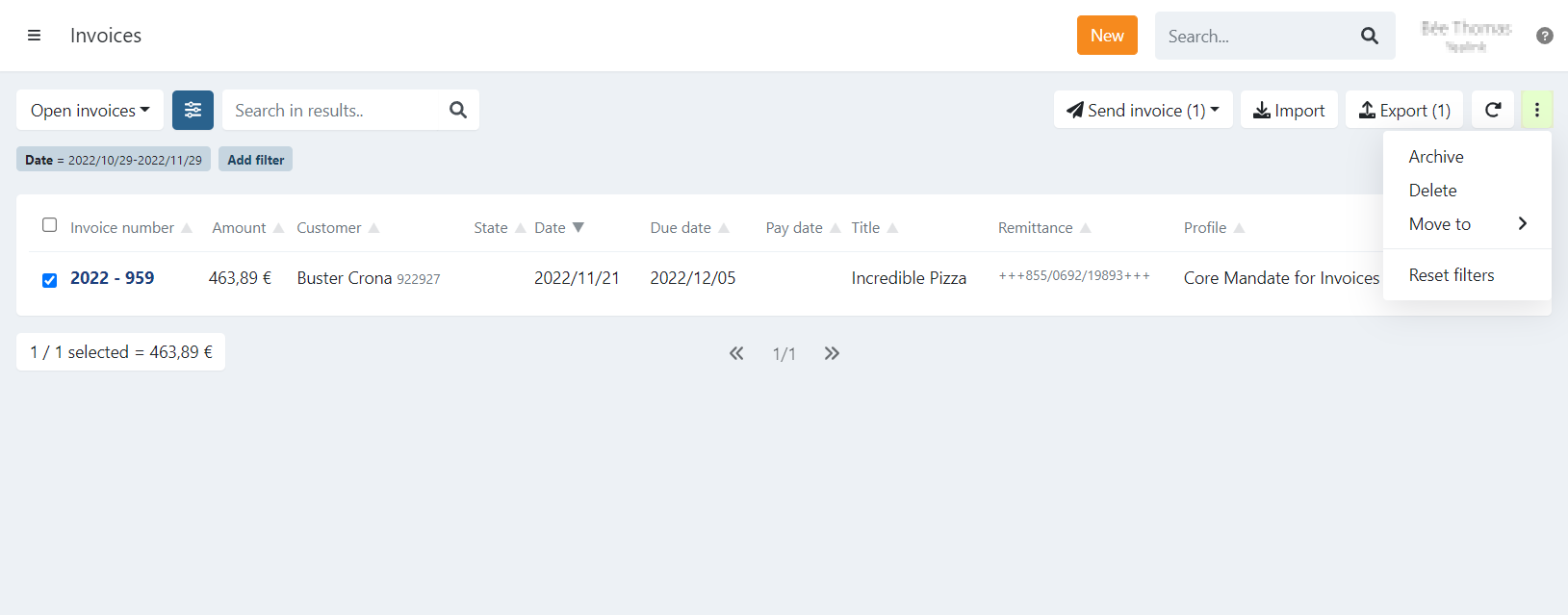
- Navigate to the invoice menu overview
- Select your invoice(s) with the checkbox
- Click Actions in the top-right corner.
- Click Archive
- Confirm with Yes
The selected invoice(s) will be archived.
It is also possible to perform the same action from the details of one invoice.
Click Actions and select Archive.
The automatic reminders on expired invoices are suspended from the moment the invoice is archived.
Why an invoice cannot be archived
An invoice cannot be archived while its status is In Progress, as this indicates that a linked transaction is currently being processed.
If the related transaction is removed from the collection batch, the invoice status will automatically change back to Booked — or to Expired if the due date has already passed.
Once the invoice is no longer in progress, archiving becomes available again.
Last Update: 2026-03-03