
How to cancel an agreement and undo a cancellation
- Cancel or suspend?
- Cancel an agreement
- Collect again after a cancellation
- Reactivate after a suspension or undo a ...
Show me
Cancelling an agreement permanently stops it from being used for collection. You can cancel manually from the agreement detail page, or automatically through the failed payment workflow.
Cancel or suspend?
Suspend - the agreement is temporarily on hold. Open transactions become uncollectable but stay linked to the agreement. Reactivating makes them collectable again. Typically used for temporary pauses, dunning steps, or fraud rules.
Cancel - meant to be final. Open transactions are processed or closed according to the mandate cancellation strategy in your profile settings. To collect again, you normally invite the customer to sign a new agreement. Only when the cancellation was a mistake can you undo it.
If you only want to stop collecting for a while, suspend the agreement instead of cancelling it.
Cancel an agreement
- Navigate to Agreements in the left-hand navigation menu.
- Click the agreement to open the detail page.
- Click the cross icon in the top-right corner, or click Actions and select Cancel.
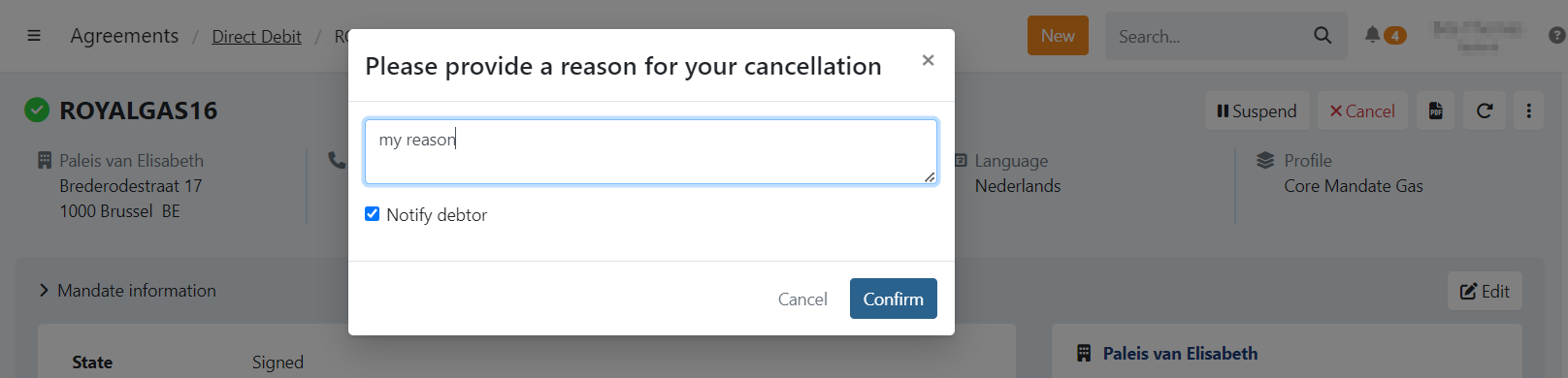
- Provide a reason for cancellation.
- Choose whether to notify the customer about the cancellation with Notify debtor.
- Click Confirm.
What happens to open transactions
Transactions that have not yet been sent to the bank are labelled as Unsettled. They can no longer be sent to the bank, but manual actions are still possible.
- Navigate to Transactions in the left-hand navigation menu.
- Click Unsettled.
- Filter on Never collected.
- Select the transaction(s).
- Click Action and choose an action.
Is the mandate also cancelled at the bank?
CORE mandates - no cancellation notification is sent to the bank. The exception is Belfius, where Twikey can also exchange the mandate status for CORE mandates.
B2B mandates - yes. B2B mandates are registered at bank level, so the bank is notified of the cancellation.
In both cases, open transactions are handled according to the cancellation strategy configured in your profile settings.
What happens to subscriptions
All subscriptions linked to the agreement - whether active or suspended - are cancelled when the agreement is cancelled.
If the cancellation is undone later, you can restart subscriptions by opening a cancelled subscription and selecting Start over.
Collect again after a cancellation
There are two ways to use a cancelled agreement again:
- Invite the customer again - the customer signs the agreement again. This is the normal way back after a cancellation.
- Undo the cancellation - the agreement becomes signed again with its existing signature. Use this only to correct a cancellation that should not have happened.
Option 1 - Invite your customer to sign the agreement again
- Navigate to Agreements in the left-hand navigation menu.
- Filter on Cancelled.
- Click the agreement to open the detail page.
- Click the paper plane icon in the top-right corner, or click Actions and select Share.
- Send the signing invitation to the customer, or copy the signing URL.
The customer will need to sign the agreement again.
Option 2 - Undo a cancellation made by mistake
Sometimes an agreement is cancelled by mistake: the wrong agreement was cancelled, it was cancelled too early, or an automatic step such as a failed payment workflow or a fraud report cancelled an agreement that should have stayed active. In that case you don't have to ask your customer to sign again. Because your cancellation is not sent to your customer's bank, the existing signature still covers the agreement.
- Navigate to Agreements in the left-hand navigation menu.
- Filter on Cancelled.
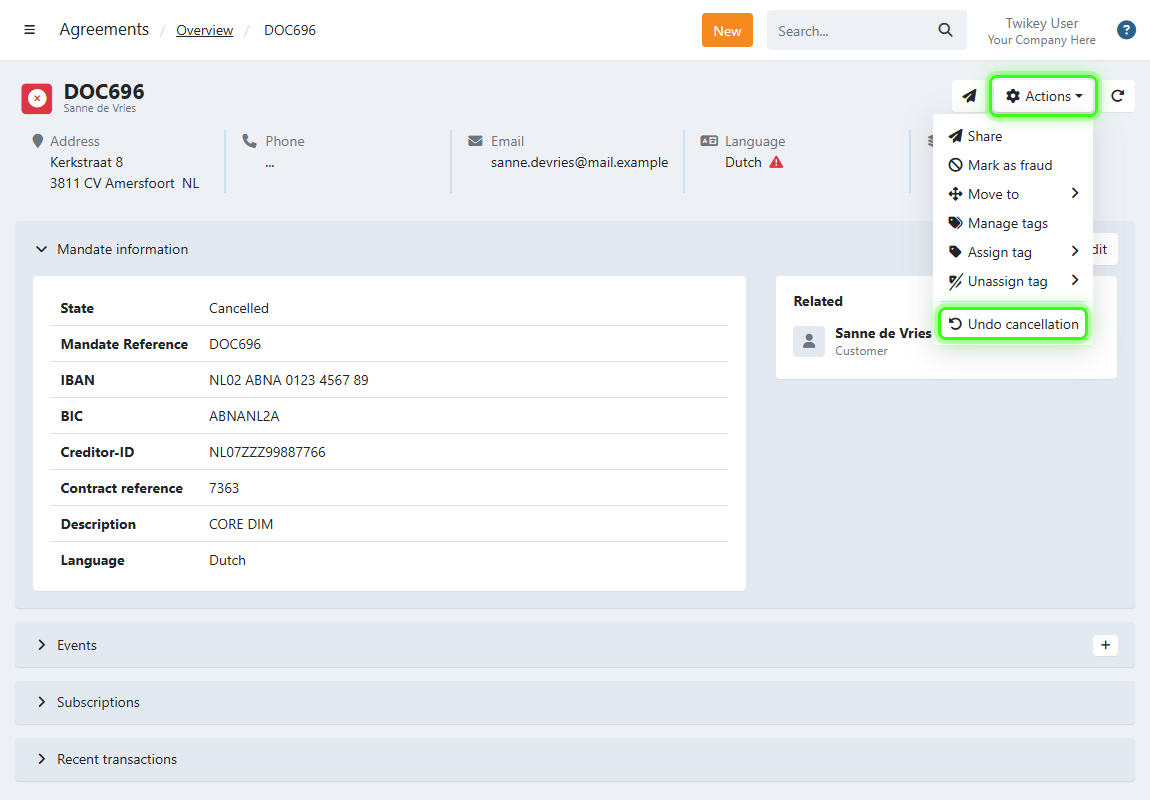
- Click the agreement to open the detail page.
- Click Actions in the top-right corner.
- Select Undo cancellation.
- Confirm that the agreement becomes signed again without a new signature.
When can a cancellation be undone?
Undo cancellation is shown on every cancelled agreement, but it only works when the cancellation was done by you, or by Twikey on your behalf. This includes a cancellation by a user in the dashboard, through the API, by a step in your failed payment workflow, by a fraud report, or by the blacklisting of an IBAN.
A cancellation cannot be undone when:
- Your customer cancelled the agreement, or their bank did (for example a rejected B2B mandate or a bank switch). Undoing it would override your customer's own decision.
- A fraud rule cancelled the agreement while your customer was signing.
- Something happened after the cancellation, such as a new signature, a signing error or a rejection by the bank. This also means a cancellation can only be undone once.
In those cases you see the error Invalid state. Invite your customer to sign again instead.
There is no time limit to undo a cancellation. It remains your responsibility that the mandate is still valid: a SEPA mandate that has not been used for a collection for 36 months is no longer valid.
What happens when you undo a cancellation
- The agreement returns to Signed with its previous signature. If the agreement was suspended before it was cancelled, that suspension is lifted as well.
- Open transactions that were handled by your mandate cancellation strategy are not restored.
- Subscriptions stay cancelled. Restart them by opening each cancelled subscription and selecting Start over.
- The history of the agreement shows a Reactivated entry followed by a Signed entry, with the user and the time.
- Your customer is not notified. Undoing a cancellation is an internal correction.
- If you use an integration, it receives the same signed update as for a newly signed agreement.
Undo cancellation is only available in the dashboard, for users with permission to manage agreements. It is not available in bulk, as a scheduled task or through the API. Through the API, you create a new agreement instead.
Reactivate after a suspension or undo a cancellation?
Both actions make an agreement usable again, but they serve a different purpose:
- Reactivate (suspended agreement, play icon) - ends a planned, temporary pause. It is always possible while the agreement is suspended, can be scheduled or done in bulk, and is also available through the API. Uncollectable transactions become collectable again.
- Undo cancellation (cancelled agreement, actions menu) - corrects a cancellation that should not have happened. It is only possible after a cancellation by you, only once, and only manually. Open transactions are not restored and subscriptions stay cancelled.