
Delete an unsent batch of transactions
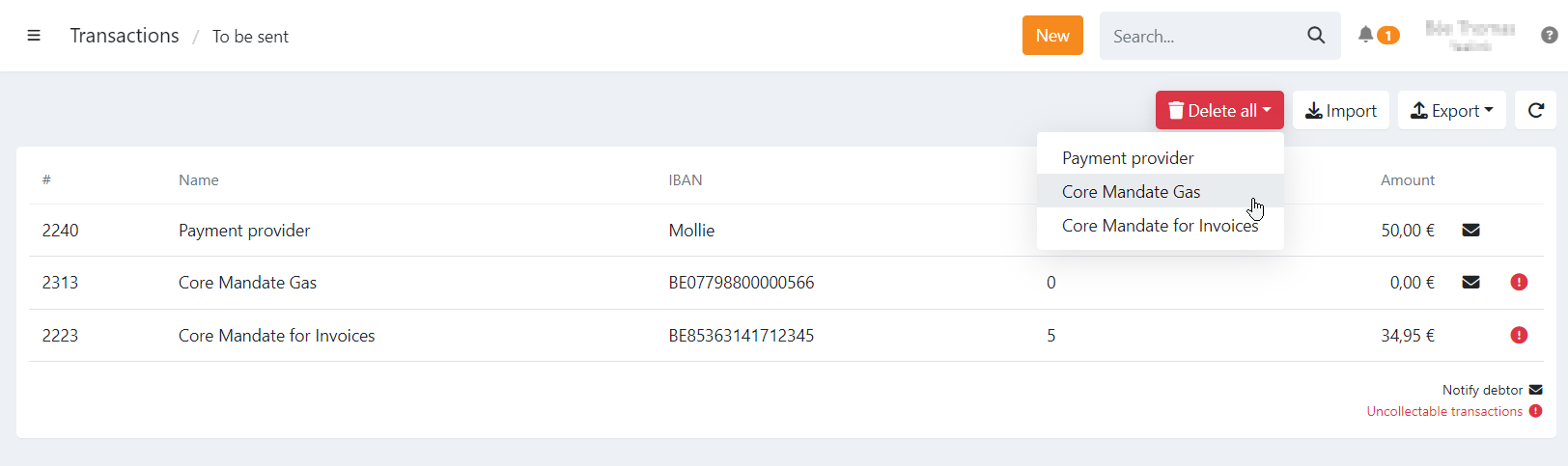
Only batches that have not yet been sent to the bank or payment service provider (PSP) can be deleted. Deleting a batch removes the link between the batch and its transactions. The transactions themselves are not deleted — they become eligible for transmission again and will be included in the next batch for their profile.
How to delete an unsent batch of transactions
- Navigate to Transactions
- Navigate to To be sent
- Click 'Delete all' button
- Select the batch of transactions you want to delete
This action cannot be undone. Make sure you really want to delete the batch before confirming.
Impact on linked invoices
If the batch contains transactions linked to invoices:
- Deleting the batch or individual transactions will revert the invoice(s) to “Booked” status immediately.
- If an invoice has already passed its due date, its status will become Expired instead of Booked.
- Any configured automatic invoice reminders will continue to run incrementally according to the current reminder level, due date, and grace periods.
Last Update: 2026-04-08