
About refunds
Refunds can be used to fully or partially refund a transaction to a debtor or to perform a credit transfer between accounts.
Requirements to manage refunds
To manage refunds in Twikey, you must have at least one active payment method.
For more details, see Managing your payment methods.
Refund screen overview
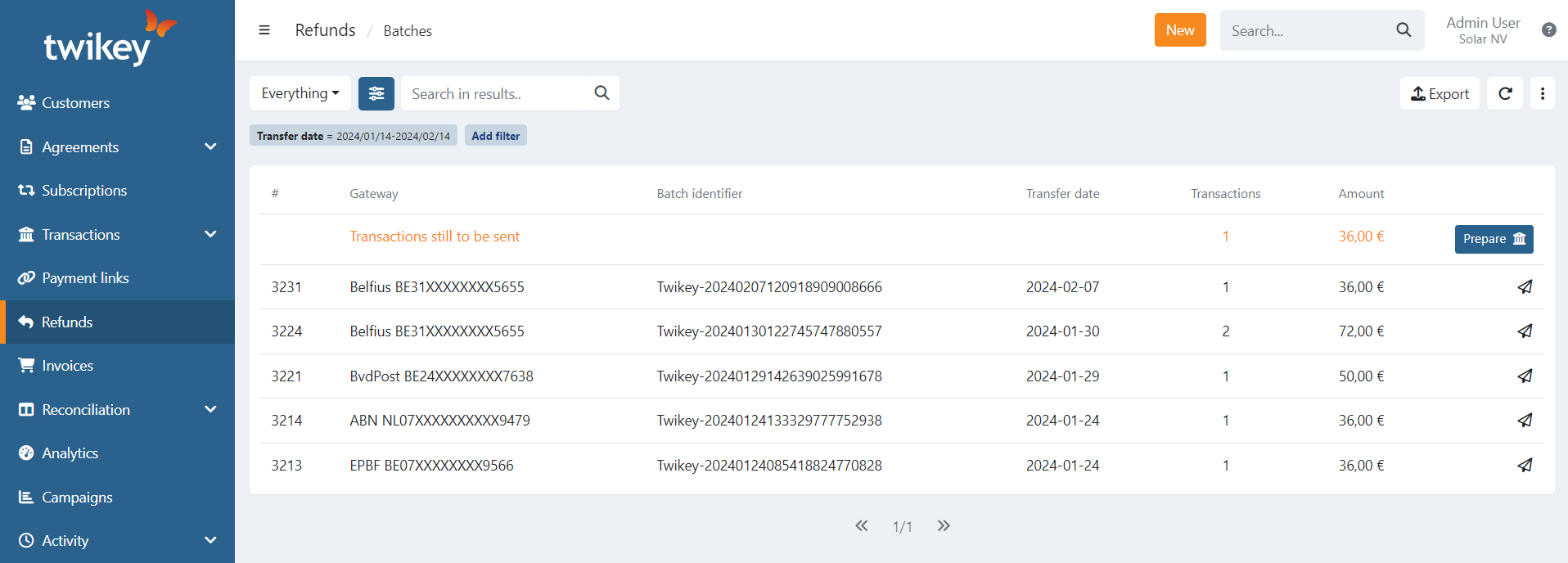
The Batches section provides an overview of all refund batches, including batches that are pending submission to the bank and those that have already been sent.
For sent batches, the overview displays:
- Refund ID
- Gateway (bank account or payment provider) from which the money is debited
- Batch identifier (PmtInfId)
- Transfer date of the refund
- Number of transactions in the batch
- Total amount of the batch
Pending batches are marked with the text Transactions still to be sent and include a Prepare action.
Filtering and searching refund batches
Use the preset and advanced filters to narrow down the list of refund batches:
- Everything – all records
- With feedback – batches that received feedback from the bank
- Feedback missing – batches without bank feedback
- Archived – archived batches
Within the current list of records, you can search for batches using full or partial values for:
- Refund ID (#)
- Gateway
- Batch identifier
- Number of transactions
- Amount (in cents)
The search function does not limit your export to only the displayed results. To export a specific subset, apply the (advanced) filters first and then export.
Last Update: 2026-02-24