
Payment link details
Click a payment link in the overview to open its details. Depending on the state, a panel with two or three tabs appears.
Payment link states
- Created — the payment link has been created but not yet opened by the customer.
- Clicked — the payment link has been opened but not yet paid.
- Paid — the payment link has been paid.
- Expired — the expiry date has passed with no payment received.
- Declined — the payment was unsuccessful, either because the customer declined or a problem occurred during payment.
Share tab
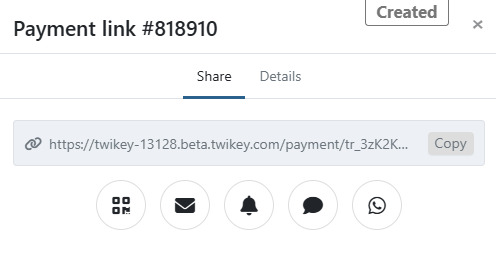
Send the payment link to the customer. Learn more about it here.
This tab is available for payment links in the following states: Created, Clicked, Expired, and Declined.
Details tab
Shows the key details of the payment link. Always available regardless of state.
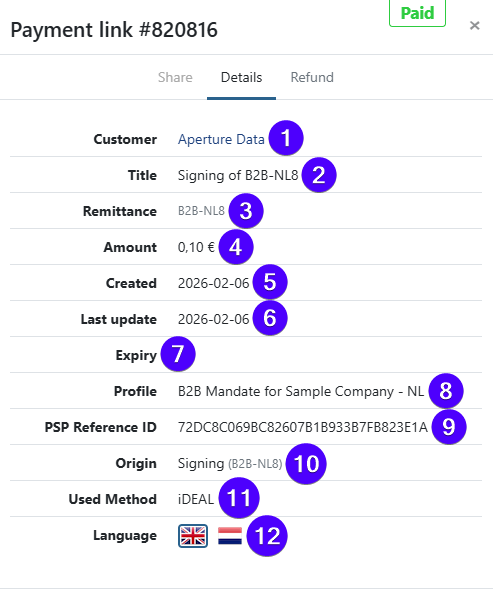
- (1) Customer — the targeted customer.
- (2) Title — the payment description shown to the customer.
- (3) Remittance — the payment reference.
- (4) Amount — the payment amount.
- (5) Created — the creation date.
- (6) Last activity — the date of the most recent event.
- (7) Expiry — the expiry date, if set.
- (8) Profile — the profile used for this payment link.
- (9) PSP Reference ID — the reference ID from the payment service provider.
- (10) Origin — how the payment link was created (see below).
- (11) Payment method — the method used by the customer to pay.
- (12) Language — the language shown to the customer on the payment page.
Origin indicates the source of the payment link. Possible values:
- API — created via API. If a
X-PARTNERheader was included, the partner name is shown in brackets. - First payment — used to authenticate an agreement as a first payment.
- Dunning — created by a dunning step, linked to a failed transaction via automated dunning, a manual dunning action, or the API using the
txrefparameter. - Invoice — originated from an invoice.
- Credit Card Renewal — created via a task to renew a recurring credit card agreement.
Origin is only shown if the payment link was created through one of the methods above.
Refunds tab
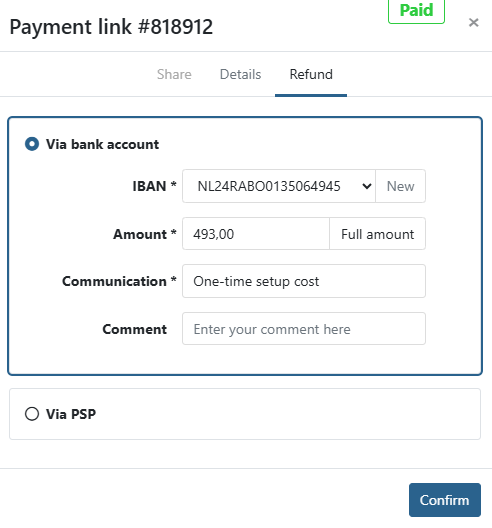
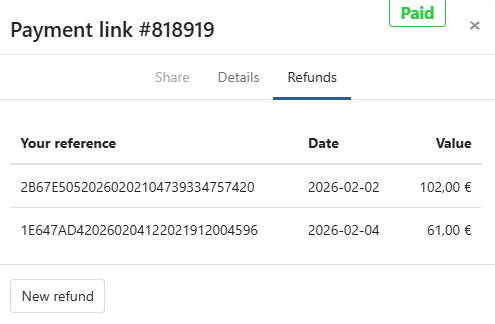
Refund a paid payment link, partially or entirely. This tab is only available for payment links in the Paid state.
If no refund has been sent yet:
If one or more refunds have already been sent:
Learn more about refunding a payment link.