
Automated Peppol invoice delivery
After I uploaded my invoices, they should be sent immediately via the default or customers preferred method..
All uploaded invoices are sent directly without any manual intervention!
For this setup, check the box at
- Settings
- Profiles
- Invoices
- Submenu invoices
- Send the invoice when a new invoice is booked (default= Peppol or email).
If you want to set the default sending for your company to Peppol, contact Twikey support.
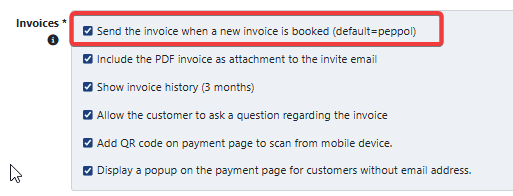
Twikey will first try to send the invoices to Peppol. Depending on the result, different actions will be taken.
- Successful delivery on Peppol > Send “Invoice via Peppol” mail.
- Unsuccessful delivery on Peppol > Twikey will mail the invoice using the standard "Invoice" mail.
Remarks
- If you want to send an invoice trough sms or postal service, you need to set up the correct module. Extra costs may be applicable depending on the chosen service.
- If the customer does not have an email address, the invoice will not be delivered!
Last Update: 2026-03-10