
FAQ - Customers
How can I create a customer?
Please refer to the following guide: How to create a customerHow can I create multiple customers in one go?
If you already have a database of your existing customers, then you can do this by importing your customers to Twikey. Please refer to the following guide: How to import customersIn the Twikey interface, why can't I see all of my customers?
By default, we only display the first 500 customers (in alphabetical order). Regardless, you can look up for specific customers using our search bar or narrow the list of displayed customers using our filters. Please refer to this guide to learn more about it.How can I edit multiple customers in one go?
Please refer to the following guide: Editing multiple customers in one goHow can I change my default communication language with a customer?
You can change it on the basic information section of the customer details interface.Is it possible to convert a person-type customer to a company-type customer? And vice versa?
Yes, you can convert a person-type customer to a company-type customer (and vice versa). To do so, please refer to this guide.How can I extract my customer database from my Twikey environment?
You can do this by exporting your customers. Please refer to the following guide: How to export customersMy customer has signed an agreement in the past. Now, he/she would like to review that agreement. How can I send him/her that agreement again?
To do this, navigate to the agreements section of the customer details interface. Then, click on the paper plane icon, as shown in the image below: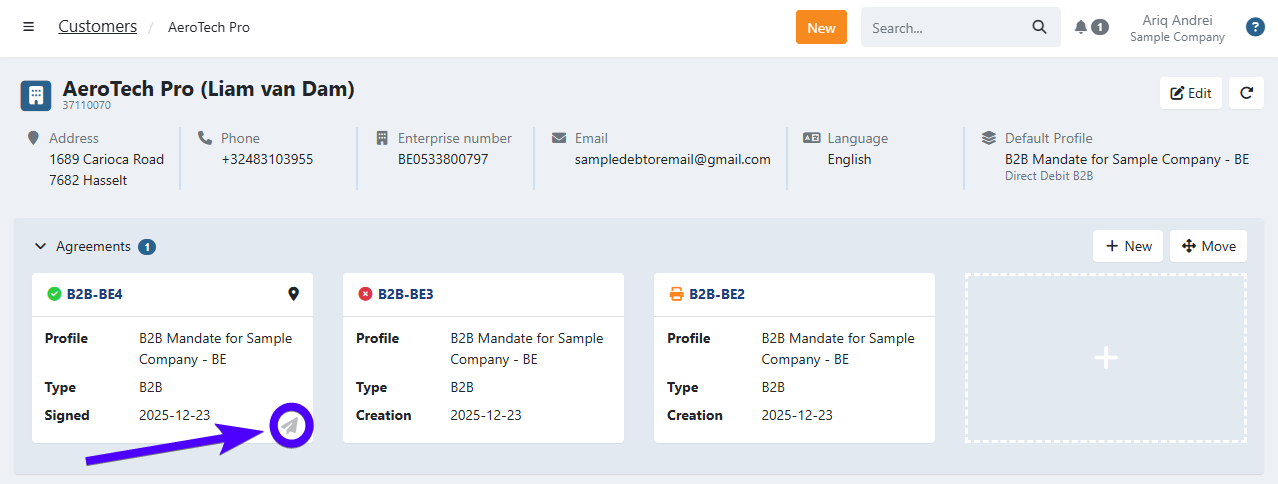
How can I add/edit customer numbers in bulk?
You can do this by following the Editing multiple customers in one go procedure. You can adjust it under the customerNumber column, as highlighted on the image below: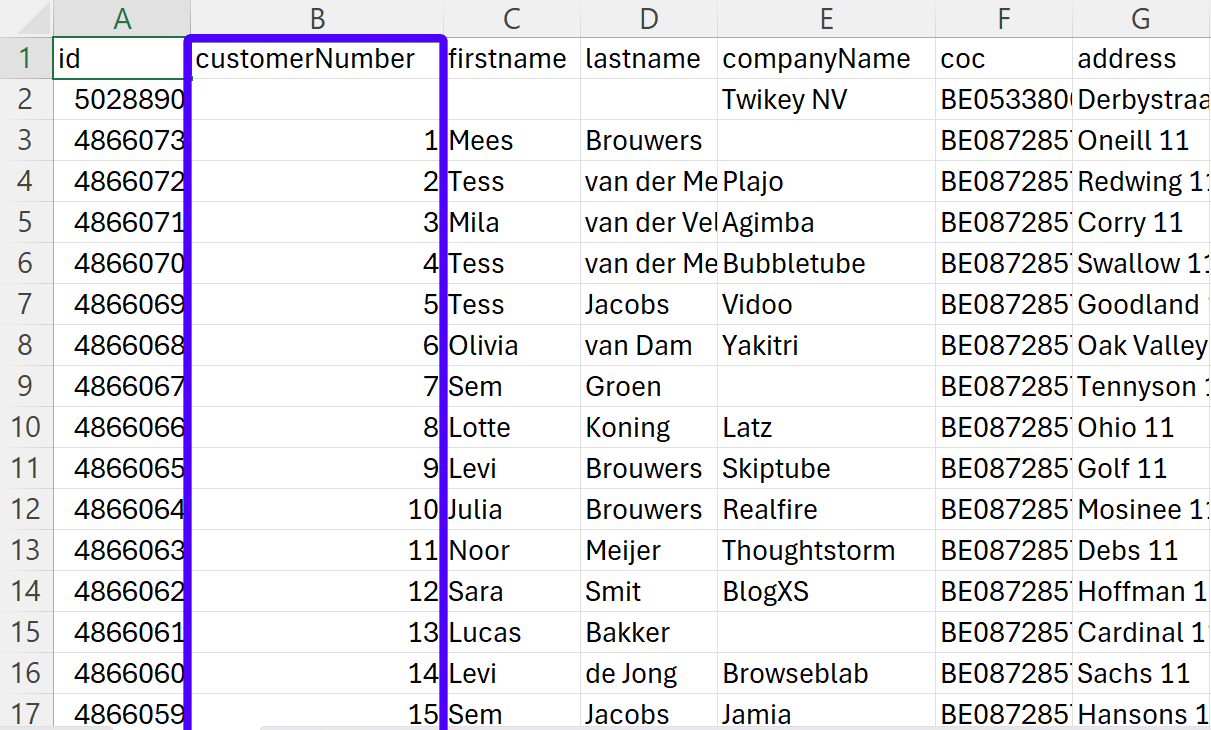
Why is assigning a customer number for each customer highly recommended?
There are several reasons for this:
- A customer number is a unique identifier for each customer. This makes identifying customers easier and minimizing the possibility of having duplicated customers.
- To prevent unwanted merging of customers: when two or more customers have the same e-mail address (and none of them have a customer number), these customers will automatically merge into one customer. This compromises the accuracy of your database.
- When you're importing invoices via CSV, a customer number is used to assign an invoice to a specific customer.
Can a merged customer be split again?
Unfortunately, that's not possible.I would like to delete a customer, but I can't see the delete button. Why is this the case?
There are certain conditions that disable you from deleting a customer. For further details, please refer to this guide.Troubleshooting
I've tried to create a customer, but it didn't get created.
If the newly created customer doesn't have a customer number and shares the same email address as another (already existing) customer, then this newly created customer will be automatically merged with that existing customer. Therefore, we recommend you to always include a customer number when creating a customer.I can't find a specific customer in my customer overview interface?
By default, we only display the first 500 customers (in alphabetical order). Regardless, you can search for specific customers using our search bar or narrow the list of displayed customers using our filters. Please refer to this guide to learn more about it.I have duplicated customers on my Twikey customer database. How can I solve this?
You can merge duplicated customers by following this procedure.. Be aware that you can only duplicate two customers at a time. If you have more than two duplicated customers, then you will have to repeat this process until there are no more duplicates left.I'm importing customers using a CSV file, but I got an error message.
Generally, this happens when you haven't filled in all of the required data, or you've inputted invalid data. You can solve this by filling in all of the required data correctly - which is listed here.My customer received an e-mail in English, even though his/her default language is another language.
The language used on e-mails sent to your customer are configured on the profile's general settings.. Imagine if a customer has German set as his/her default language on the customer details interface. However, the profile's general settings don't have German enabled as one of its languages. In this case, the default fallback language is English, as English by default is always enabled in any profile. To prevent this from happening, please make sure that you've enabled all of the languages that your clients speak in the profile's general settings.Last Update: 2026-01-12