
How to export customers
You can extract your customer data out of Twikey and use it in other platforms (for example: your CRM tool, ERP system, accounting software, etc.). To do this, you will need to export your customers.
Steps to export
- Navigate to the customer overview interface.
- If needed, you can adjust which customers are displayed on this interface. Use our search bar and filters to adjust this. You can use it to pre-select customers based on certain properties (for example: to separate company-type customers from person-type customers).
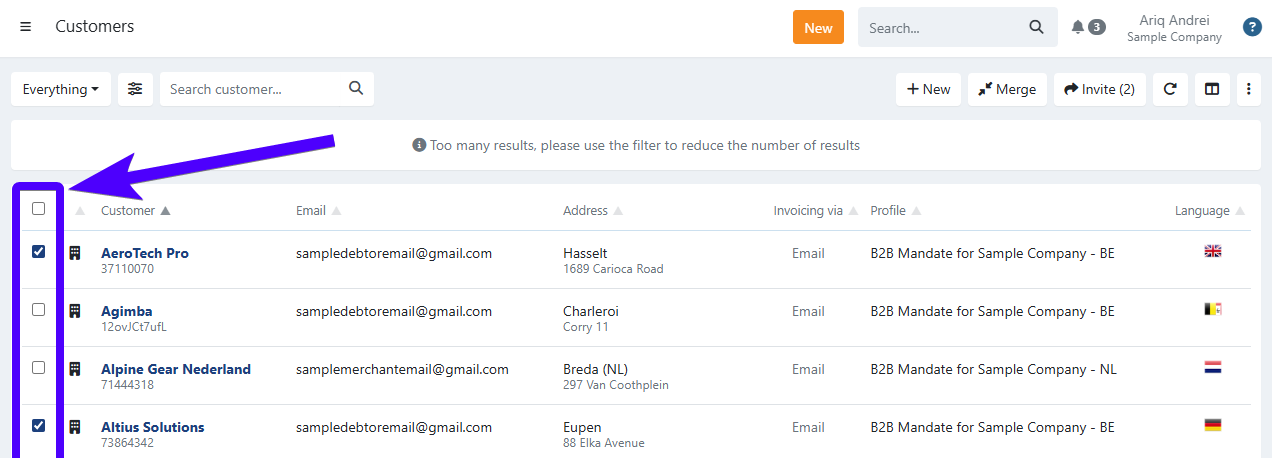
- Tick the box next to the customers that you'd like to export. You can also tick on the uppermost box to select all customers.
- Click on the three-dot icon.
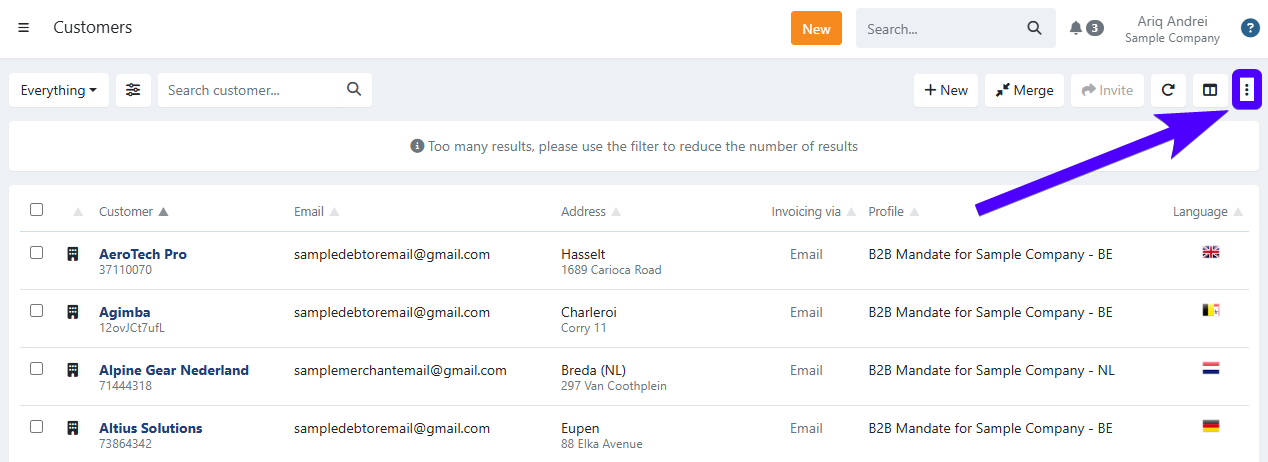
- Click on Export.
- Afterward, a CSV file will be downloaded to your computer.
Explanation about the headers in the CSV file
The downloaded CSV file contains several headers - each of them containing specific information about your customers. Below, you'll find the explanation of each header.
| Field | Description |
|---|---|
| id | This is the customer's unique ID in Twikey's database. |
| customerNumber | A customer number is the number that you/your organization designate to identify a customer. |
| firstname | The first name of the customer. |
| lastname | The last name of the customer. |
| companyName | The name of the customer's company. This only applies if the customer is a company-type customer. Otherwise, it will be empty. |
| coc | The customer's Chamber of Commerce number (or more commonly known as enterprise number/ondernemingsnummer/numéro d’entreprise). If the customer doesn't have an enterprise number or is a person-type customer, then it will remain blank. |
| vatno | The customer's VAT (Value Added Tax) number. If the customer doesn't have a VAT number or is a person-type customer, then it will remain blank. |
| address | The street & house/building number of the customer. |
| zip | The post code of the customer. |
| city | The city of the customer. |
| country | The customer's country in the 2-character ISO code format. For example: BE for Belgium and NL for the Netherlands. |
| The customer's e-mail address. | |
| mobile | The customer's mobile phone number. |
| l | This represents the customer's language. At the moment, these are the possible languages: en (English), nl (Dutch), fr (French), de (German), it (Italian), es (Spanish), and pt (Portuguese). |
| delivery | The customer's preferred invoice delivery/sending method. |
Last Update: 2026-01-20